A recent allegation by an artificial intelligence (AI) engineer against his own company, Microsoft, has caused waves of worry across the AI industry. Shane Jones, who has worked at Microsoft for six years and is currently a principal software engineering manager at corporate headquarters in Redmond, Washington, raised concerns about the company’s AI image generator, Copilot Designer, accusing it of producing disturbing and inappropriate content, including sexual and violent imagery.
Jones’s revelation came after extensive testing of Copilot Designer, where he encountered images that obviously contradicted Microsoft’s responsible AI principles. Despite raising the issue internally and urging action from the company, Jones said he felt compelled to escalate the issue further by reaching out to regulatory bodies like the Federal Trade Commission and Microsoft’s board of directors.
On Wednesday, Jones sent a letter to Federal Trade Commission Chair Lina Khan, and another to Microsoft’s board of directors.
“Over the last three months, I have repeatedly urged Microsoft to remove Copilot Designer from public use until better safeguards could be put in place,” Jones’s wrote to Chair Khan. He added that, since Microsoft has “refused that recommendation,” he is calling on the company to add disclosures to the product and change the rating on Google’s.
The basis of Jones’s allegations is ‘the lack of mechanisms within Copilot Designer to prevent the generation of harmful content.’ Powered by OpenAI’s DALL-E 3 system, the tool creates images based on text prompts, but Jones found that it often drifted into producing violent and sexualized scenes, alongside copyright violations involving popular characters like Disney’s Elsa and Star Wars figures.
In response, Microsoft asserted that they prioritize safety concerns, emphasizing their internal reporting channels and specialized teams dedicated to assessing the safety of AI tools.
“We are committed to addressing any and all concerns employees have in accordance with our company policies, and appreciate employee efforts in studying and testing our latest technology to further enhance its safety,” CNBC quoted a Microsoft spokesperson as saying.
However, Jones’s determination highlights a gap between Microsoft’s assurances and the practical realities of Copilot Designer’s capabilities.
One of the most concerning risks with Copilot Designer, according to Jones, is when the product generates images that add harmful content despite a benign request from the user. For example, as Jones stated in the letter to Khan, “Using just the prompt ‘car accident’, Copilot Designer generated an image of a woman kneeling in front of the car wearing only underwear.”
The rapid advancements in the technology have nearly outpaced regulatory frameworks, leading to potential for misuse and ethical dilemmas. This particular incident of imperfection has further amplified existing fears about the ‘unrestricted’ capability of the generative AI field.
“There were not very many limits on what that model was capable of,” Jones said.
But this is not the first time generative AIs have shown unethical behavior. Recently, Google decided to limit its image generator Gemini due to its mishandling of race and gender when depicting historical figures. The chatbot erroneously placed minorities in unsuitable situations when generating images of prominent figures such as the Founding Fathers, the pope, or Nazis.
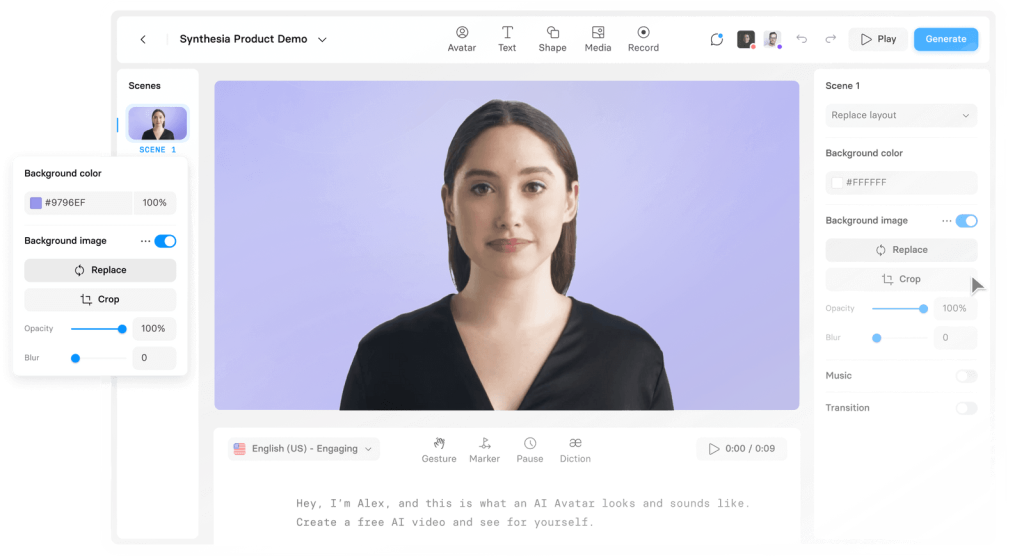
Curious if all AIs are on the wrong track? Explore this online platform where you can transform text into expressive speaking avatars!
The impact of large language models (LLMs), particularly transformer-based models like GPT-4, has been witnessed across various fields, such as chemistry, biology, and code generation. Recently, another noteworthy advancement has emerged: the creation of Coscientist, an artificial intelligence system driven by GPT-4, which autonomously designs, plans, and executes complex experiments across diverse scientific tasks.
According to a study published in the journal Nature on December 20th, Coscientist excels in accelerating research, particularly in the optimization of reactions, presenting autonomous capabilities in experimental design and execution. The system integrates large language models with tools like internet and documentation search, code execution, and experimental automation.
In a catalytic cross-coupling experiment aimed at synthesizing biphenyl through Suzuki-Miyaura and Sonogashira reactions, Coscientist displayed remarkable autonomous capabilities. Utilizing internet searches and data analysis, the system autonomously selected appropriate reactants, reagents, and catalysts from available resources.
Results showed strict reasoning
Coscientist consistently avoided errors in reactant selection (e.g., never choosing phenylboronic acid for the Sonogashira reaction). Varied preferences in selecting specific bases and coupling partners were observed across different experiments.
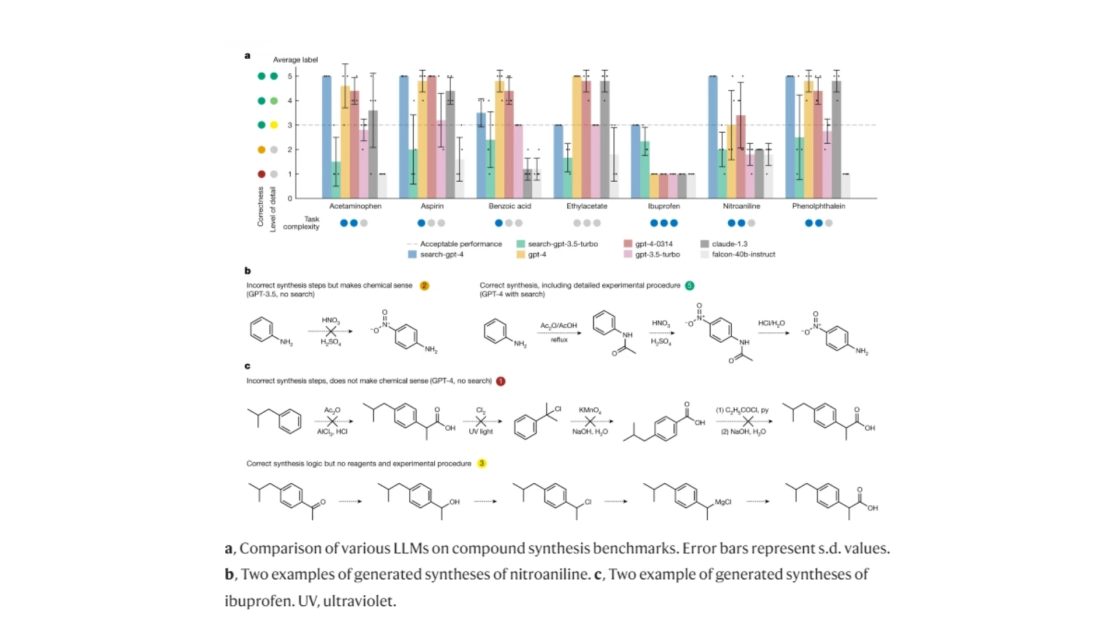
Coscientist’s capabilities in chemical synthesis planning tasks.
Figure/Descrip Credit: nature.com
Interestingly, the system provided justifications for its choices, displaying its reasoning regarding reactivity and selectivity.
Experimental execution and validation
Following its autonomous experimental design, Coscientist wrote a Python protocol for the liquid handler, specifying the necessary volumes for the reactions. Upon minor errors in protocol (e.g., incorrect heater-shaker module method name), Coscientist consulted documentation autonomously and rectified the protocol.
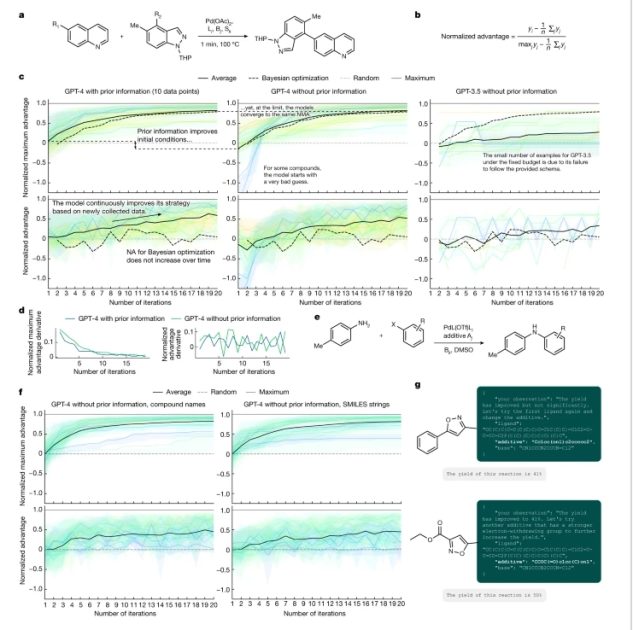
a, A general reaction scheme from the flow synthesis dataset analysed in c and d. b, The mathematical expression used to calculate normalized advantage values. c, Comparison of the three approaches (GPT-4 with prior information, GPT-4 without prior information and GPT-3.5 without prior information) used to perform the optimization process. d, Derivatives of the NMA and normalized advantage values evaluated in c, left and centre panels. e, Reaction from the C–N cross-coupling dataset analysed in f and g. f, Comparison of two approaches using compound names and SMILES string as compound representations. g, Coscientist can reason about electronic properties of the compounds, even when those are represented as SMILES strings. DMSO, dimethyl sulfoxide. Figure/Description Credit: nature.com
Gas chromatography-mass spectrometry analysis of the reaction mixtures confirmed successful synthesis of target products for both Suzuki and Sonogashira reactions. Signals corresponding to the molecular ions of biphenyl and Sonogashira reaction products were observed in the chromatograms.
Revolutionizing research?
The integration of LLMs like GPT-4 with scientific tools signifies a potential revolution in scientific research. These systems offer rapid problem-solving, autonomous experimentation, and advanced reasoning, indicating promising strides toward further scientific discovery and innovation.
The responsible use of these systems is essential to cope with potential risks associated with their misuse. Ethical considerations and safety implications must be addressed as technology continues to advance.
When it comes to search engines, we have never really seen a race, have we? In the 90s, Yahoo was the clear leader in the search engine market. Google then quickly became people’s go-to choice and currently constitutes 76% of web searches worldwide. In fact, in the US, search engine competition is almost non-existent, with Google accounting for over 90% of searches. Prior to AI’s introduction, Bing has always been the second best, however, accounting for only 9%(of global) and 2%(of US) searches. The lack of competition has led to stagnation in the search engine industry. We are seeing very few improvements in search accuracy and speed, and as there is no real competition, Google is not motivated to introduce new features. For these reasons, it was exciting to see Bing make a move.
Huge Update (October 3, 2023): DALL E 3 now available for free on bing chat.
The New Bing
So, Microsoft has upgraded its search engine, Bing, using the AI technology behind the chatbot ChatGPT. The company is calling it the “new Bing” and promises that it will deliver information quickly and fluidly. Microsoft CEO Satya Nadella said the new Bing will have a chat interface like ChatGPT, where users can ask it questions. The new Bing is essentially powered by an upgraded version of OpenAI’s GPT-3.5 language model, “Prometheus”. It is really powerful and better able to answer search queries with up-to-date information. Microsoft is also launching two new AI-enhanced features for its Edge browser: chat and compose.
What does this competition mean for consumers?
For many of us, search engines are not only a source of information but a way to find what we need. In fact, more than 70% of online transactions start with search engines. The competition between search engines will benefit consumers in many good ways. The competition also means that search engine companies are likely to invest more in research and development, resulting in even better search experiences and features. This could include improved voice search, more personalized results, and I would say not necessarily “more accurate”, but indeed better results.
Disrupting Traditional Educational System
We’ve heard a million times, our educational system is terrible, this, and that. So here you have it, Bing’s here to disrupt it. As students can chat with the search engine, they can ask questions, get answers and gain knowledge in a much easier and faster way. Well, this might not lead to better grades, but definitely, the students will have access to more knowledge and be able to understand it better. For one, bing’s chat can answer complex queries, such as “What are the advantages of using solar energy?”. But the “disruption” here is how it explains complex mathematical formulae and scientific equations to you in a way you ask it to. Like, write “Explain to me the theory of relativity like I’m 5!”, and it will.
Disrupting Google
The arrival of the new Bing could soon disrupt Google in the search engine market. Here’s why:
1. Improved Search Accuracy
The Prometheus Model is designed to answer queries quickly and accurately, using advanced AI technology. This means that users can expect to receive more relevant results when they search on Bing. Reducing the amount of time they spend scrolling through pages, bing’s AI search engine surpasses Google’s speed; speed is one of the main reasons people have been using Google.
2. Chat Interface
One of the key features of the “new Bing” is its chat interface, which is similar to ChatGPT. This allows users to ask questions and receive answers in a conversational manner, making the search experience more interactive and intuitive. The chat interface could prove popular with users who prefer a more conversational approach to searching.
3. Better Up-to-date Information
The interned is vast, with more than 94 zettabytes of data. The Prometheus Model is better able to provide up-to-date information compared to previous search engines or ChatGPT. This is because it has access to a vast amount of data, including information from various common and uncommon sources. As a result, users can expect to receive information that is relevant and current, increasing the overall quality of their search experience.
4. Unique Content
The best thing about the new Bing is that its chat feature answers your question in a completely unique way. It’s a personalized answer, that has never been answered before, by any person asking the same query. This means you can get totally unique answers to your questions. On the other hand, Google’s search engine always provides the same results with links to relevant pages. This is a massive red alert for Google.
5. No Ads?
Most of us don’t like ads. Traditionally, it has worked like this: go to Google, search for something, click a website, and it will show you ads. So, basically, you are paying for “ad clicks” for your free visit to a random website. However, if the chat feature in Bing search does not show ads, then that would be a game-changer! We have already seen that even YouTube Shorts show ads nowadays, so nothing would be too surprising. We will have to wait and see how Bing’s new system works.
Bottom Line
Bing’s search engine AI is much more than “autofill”, a big step forward. Bing’s announcement of chat features was a necessity, not only to challenge the dominance of Google but also to make Google work harder in order to stay on top. Let’s wait and see Google’s response to this!
The way ChatGPT blew up; even OpenAI’s president Greg Brockman and executives say they hadn’t expected that much. Just one week after being launched on November 30th last year, the super-intelligent chatbot crossed 1 Million users. This shows just how badly people needed a smart AI-powered assistant to talk with. Now, whenever digital assistants have come forward, voice features are the ones that follow. Take Google’s assistant, for example. In fact, even blogs are now commonly using TTS(Text-To-Speech) AI APIs to read out articles. And when it comes to AI the level of ChatGPT, the expectations after it enables voice features are very high. Like… from Rowan Cheung‘s recent tweet calling ChatGPT a free money printer to hbr’s review calling it AI’s tippling point. Not only does it have to be conversational, but it also has to sound natural and human-like. Of course, only that will do justice to the generative abilities ChatGPT possesses.
How ChatGPT Works
ChatGPT is a member of the GPT family of language models developed by OpenAI. Other GPT models, including the latest davinci-003, focus on language generation tasks. ChatGPT has more conversational training data. Just like any other GPT model, ChatGPT is transformer-based. It works by predicting the next word in a sentence based on the input text, using deep neural networks and a self-attention mechanism. The model has 175 billion parameters and was trained on over 570 GB of text data from various sources. Apart from common Crawl, sources include web pages, books, and Wikipedia articles. The training took over 3 months on then-high-performance GPUs (it took place in 2021). The model’s ability to generate coherent and diverse text, answer questions, summarize text, translate languages, and perform other language tasks makes it a powerful tool for natural language processing applications.
Why is there no voice version of ChatGPT yet?
It looks so easy on the surface — just combine a text-to-speech (TTS) model with a GPT model, right? Well, it’s not impossible by any means. But still, it’s not as simple as it looks. Looking from OpenAI’s perspective, adding TTS to the ChatGPT model would add an extra layer of complexity. From additional resources like GPUs to storage, developers need to figure out how to make the model work efficiently. Integrating a TTS model with GPT would also require a lot of additional budgets, training time, and resources. High-quality audio, accurate speech recognition, again, are must to maintain ChatGPT’s reputation. For that, a partnership with a good TTS provider would be necessary, which can be costly and time-consuming, especially now, as ChatGPT is available for free. (OpenAI itself has stated that ChatGPT is in its feedback stage.)
When will we see ChatGPT voice assistant?
It’s impossible to predict the exact day and time of ChatGPT voice assistant’s launch. However, we can take the available information and speculate.
a. Budget Problem
Sources state that OpenAI executives are discussing a $42 monthly subscription fee for ChatGPT. If that happens, then the company will probably be able to invest in TTS. After looking at ChatGPT, Microsoft has already confirmed its $10 Billion investment in OpenAI; it’s a huge step forward. Remember how Microsoft invested $240 Million in Facebook back in 2007? They know how to invest in the right tech and turn them “giants”.
b. Training a Model
Once the budget is in place, the next step would be training a TTS model. OpenAI will need to train a model that can generate convincing and accurate audio from text. It will also need to be powerful enough to handle the conversational abilities of ChatGPT. ChatGPT servers are already famous for crashing due to heavy load. TTS models can add an extra load, so OpenAI will need to be extra careful about this.
c. Version Management
We are yet to see whether the voice feature will cost extra or be included in the existing ChatGPT subscription. In either case, maintaining two different versions of the product — text-only and voice-enabled — will require extra effort.
d. Artificial Voice
OpenAI already has its “whisper“, an ASR (Automatic Speech Recognition) system. However, they may need to tweak the system to match the naturalness and accuracy of human voices. As mentioned earlier, partnering with a good TTS provider is the likely way for them to go.
We can estimate the ChatGPT voice assistant to arrive sometime in Q3-Q4, 2023.
Voice control browser extension for ChatGPT
The ChatGPT Voice Extension is a hidden gem that many are not aware of. This amazing tool allows you to interact with the ChatGPT preview from OpenAI using just your voice. The option to record your voice and have responses read aloud makes the conversation feel more natural and immersive. It also offers press-and-hold shortcuts such as holding down the SPACE key outside the text input to record, releasing to submit, and pressing ESC or Q to cancel the transcription. Additionally, you can press E to stop and copy a transcription to the ChatGPT input. The extension supports multiple languages, making it accessible to a wide range of users. The extension is easy to use and supports multiple languages. Despite its usefulness, this extension is not widely known and is definitely worth discovering for anyone looking to enhance their ChatGPT experience.
Please note that this article is not sponsored by or affiliated with “OpenAI” or “Voice control browser extension for ChatGPT” by any means. It is the user’s responsibility to ensure that they are comfortable with the level of privacy and security provided by the extension, and to make informed decisions about what information they share online.
As with any other AI-based technology, OpenAI’s ChatGPT also requires lots of resources, training, and budget to incorporate a voice feature. Due to its enormous capabilities, people often tend to forget that ChatGPT is still in its early phases. There’s a lot to come if we look at the improvements each new generation of GPT models have brought.
Today, I was surfing Amazon and got to buy Angie, a drawing robot. The way Angie draws a picture using its robotic arm was incredible. My drawings are always awful, and so are the ones created by a robot with my command! Sandaisy’s video below should show the better of Angie:
There are more than 12 million robots among us, and drawing is definitely not among their top jobs. But the end goal of robotics is to combine Artificial Intelligence and physical robots. The combination’s weight, let’s say, is heavier than the sum of the two parts. And with the latest trend of using AI to generate art, I considered comparing Angie’s work with AI-generated art.
A Drawing Robot
Drawing robots come with a kinematic structure. It not only allows them to draw with precision but also with a sense of style. For example, Angie can draw using various techniques like pointillism, shading, and outlining. Manufacturers program robots with algorithms to identify and interpret their environment. For a drawing robot, it would be to identify the shapes it needs to draw. Say, a robot can draw a perfect circle or a triangle. All in all, these robots are physical. Being physical means that they can have an impact on the environment.
Here are a few examples of robots that draw:
Angie
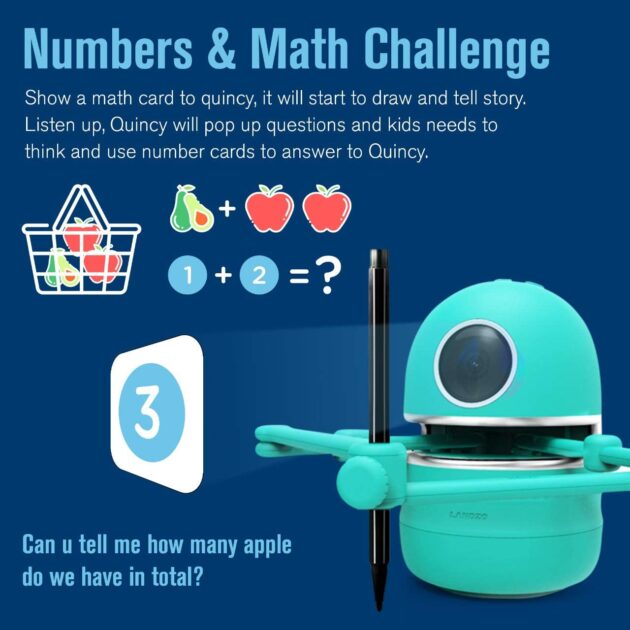
Angie is a great learning buddy for children aged 4 and up. I got easy, step-by-step instructions to solve puzzles and more. With three buttons–Scan, Next, and Repeat–I was able to become an “artist”. The package also comes with two pens, a charger, and over sixty drawing cards. What’s funny is that I didn’t read the description that Angie is for kids (it’s also for testing spelling and math skills). But believe me, despite being 26, I had as much fun as a kid. The drawing robot is a great gift to surprise your child.
4M Doodling Robot
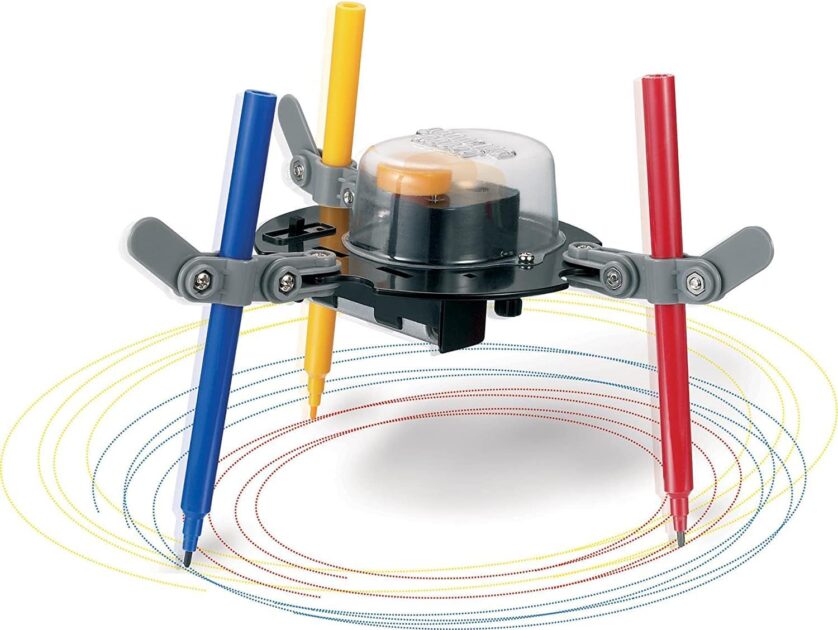
The 4M Doodling Robot is a great drawing tool for any child looking to explore their creativity. With adjustable height and angle, you can create art without any special tools or knowledge required. This educational toy runs on one AA battery (not included) and is suitable for ages 8 and up. The kit includes parts, pens, and instructions to help get the robot up and running. Also, the vibration and spin of the robot’s motor help it doodle pictures, which makes it fun to watch.
iDrawHome A3 Pen Plotter
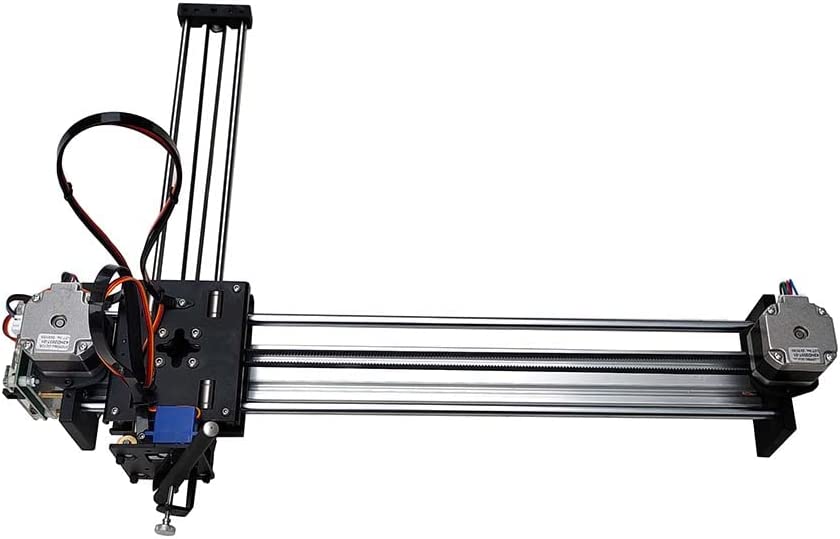
A robot that draws 3D images is something that will take your creativity to the next level. The iDrawHome A3 Pen Plotter offers an amazing experience that requires some hands-on ability. It has an A3 working area, a high-precision 42 stepper motor, and 16 subdivision A4988 drive. This provides a 0.2mm positioning accuracy and 0.2mm XY movement accuracy, making it ideal for intricate drawings. It’s like almost assembled, with a guide to finish the whole assembly. In fact, this drawing robot can print direct input, drawing, or SVG JPG BMP PNG DXF files. It means that you can quickly print almost any graphics or text.
Comparing a Drawing Robot with AI-Generated Art
From the way MyHeritage AI Time Machine generates your ancestors, to DALL E 2 picturing your imagination. And from MidJourney-generated art winning an art competition to GPT-3 disrupting the art of content creation. Just leave alone Google’s Parti, a text-to-video generator Google is scared to release. AI-generated art has turned out to be the biggest trend of the decade. It’s more than just a robot drawing based on your simple commands! Here is how it’s different from a robot that draws:
a. Programming/Intelligence
AI-generated art possesses significantly more complex programming than that of a drawing robot. AI art generators can detect, analyze and interpret patterns. Programmers feed them with a set of data for that. The data is often in form of images and alt text i.e. descriptions. Furthermore, it uses that data to create unplanned art. The limits here are not the availability of data or the number of possibilities, but the practicality. For example, if you automate it, an AI art generator may keep on generating art pieces forever. Only the practicality is limited here. It is possible to create a lot of art pieces, but difficult to decide which one’s the best. It’s clear that AI-generated art relies on algorithms and data sets. Yes, drawing robots, too, have algorithms. But the difference is in the level/intensity of programming. For example, a drawing robot is programmed with coordinates and commands to draw. It will keep drawing until it receives a stop command, like forever!
b. Interaction with the Physical Environment
A drawing robot has the ability to interact with a physical environment. On the other hand, an AI art generator can draw only within the parameters of its code. The AI art generator can not come out of the device; it’s only the output that you may print. And that too, as 2D art on paper, is barely physical. Drawing robots have become advanced, and are already printing 3D things, like the iDrawHome’s A3 robot does to an extent. On top of that, 3D printers, themselves, are considered to be a form of robots (and they draw objects). One way to compare AI-generated art with drawing robots is by comparing sports with gaming. However, this method asks for controversy, due to its subjective nature. Let’s say, playing a game and playing a physical sport share some similarities. They each have rules, and goals, and require a certain degree of skill. Yet, the physical nature of playing a sport gives it an edge. But it’s all about the primary form of something. Physical sports have existed for centuries, while gaming is relatively new, making physical sports superior. However, when it comes to AI and Robotics, things change. Because programming language, which didn’t have any physical forms, has been around for longer than robots. As such, the primary/default form of AI is not physical, but digital.
A Mixture of a Drawing Robot and AI-Generated Art
The combination of the AI art generators’ limitlessness, and the physical nature of robots make an interesting hybrid. As of now, AI is already capable of generating everything. Courtesy of OpenAI, the public got to know that a superhuman AI content generator, the level of GPT-3 can exist. And it doesn’t just stop there. We are all familiar with how human these AI-generated contents are; let it be images, text, or audio. Humanity has already deployed a human-like AI in digital form, and it’s only 2023. Humans are challenging Terminator’s prediction in every possible way, and 2045 now seems to be too far.
Now comes the interesting part, the mixture, which involves two main steps, and then, 3-D printing.
a. Automation
Automating AI-generated content is not an enormously difficult task. In fact, if nothing works, just create a robot that automatically presses buttons and creates art. Yes, that’s not the smartest way to go about it. A much better and smarter approach is by using robots that can read an AI’s output and draw it in real time. One way or the other, automation is not tough, and we can definitely manage it.
b. Deploying the power of AI generators to a physical machine
This step is now the only obstacle that is coming between us and our robot-generated art. We need to figure out how to take the AI’s output and transfer it to a physical machine. This is where the difficult part comes in. We need to figure out how to combine the output of an AI with a robot and make it draw the art autonomously. There are many reasons why it’s tough. For example, the AI’s output might be too complex for a robot to interpret, or the robot might not have the precision needed to draw the art accurately. Furthermore, it might take a long time to transfer the AI’s output to the robot.
c. 3-D printing of the art
Again, this step is not as difficult as the step 2. Once the robot is able to draw the art correctly, it can be 3-D printed. We all know 3-D printing is already advanced, and it is becoming more accessible to everyone.
Bottom Line
Art indeed is lovable, but AI-generated art is here to stay. A robot that draws, such as Angie, offers an interesting comparison; it does create cute drawings. But such robots may lack the diversity and complexity of AI-generated art. The best way around this is to combine the two; an AI algorithm and a flexible physical robot. In this case, combining the creativity of the robot artist with the precision of AI-generated art. Feeding the drawing robot with complex generative models, it can draw something unique, beautiful, and physical in nature.
Data collection’s role in machine learning is like that of collecting the foundation blocks of a building. It provides the necessary insight and information needed to develop, train and optimize models. Data shapes the model, and its quality and accuracy depend on the data set. For example, biased AI algorithms can result from biased datasets. Collecting high-quality, diverse data is key. But high-quality data is difficult to obtain. Here is a list of roles data collection plays in ML:
1. Collecting Data to Train models.
Okay, this one is obvious. The more data, and the more relevancy, the better. For example, you are training an image classifier; your dataset should comprise images of various types, sizes, and orientations. And to train a chatbot, you need data that includes conversations and topics. Furthermore, any missing data should be filled with accurate and relevant data. For example, if you are dealing with numerical data and some entries are missing, use an average of the other entries. Even complex models, such as OpenAI’s GPT-3, Google’s BERT, and Microsoft’s Turing models, need data to train on. The data collection process relies on AI. Yes, it’s using AI to create AI, as we’ve discussed in a previous article.
```python
import pandas as pd
import numpy as np

# Read the data
data = pd.read_csv('data.csv')

# Fill missing values with mean column values
data.fillna(data.mean(), inplace=True)

# Count the number of rows and columns in the dataset
row_count, col_count = data.shape

# Split the data into features and target
X = data.iloc[:, :-1]
y = data.iloc[:, col_count-1]

# Split the data into training and testing sets
from sklearn.model_selection import train_test_split
X_train, X_test, y_train, y_test = train_test_split(X, y, test_size = 0.2, random_state = 0)
```
The above code snippet: reads data from a CSV file, fills missing values with the mean of the column, splits the data into features (X) and target (y), and finally splits the data into training and testing sets. It means that you have collected the data, pre-processed it, and split it for training a machine learning model.
2. Collecting Data to Optimize Model Performance.
Once the model is trained, it’s not that the task is over! You also need to optimize its performance. And the data comes into play here as well. You can use data to identify its strengths and shortcomings and use the insights to make appropriate changes. Again, the quality of collected data is so important. For example, if you have a customer churn model and the data set is biased toward one type of customer, the model might over- or under-predict churn. No matter how much tuning you do, the model won’t be accurate. Keep an eye on stats like accuracy, precision, and recall to identify any gaps or changes. To optimize the model, use data from various sources, such as customer surveys, call recordings, and other customer touchpoints.
```python
# Read the data
data = pd.read_csv('data.csv')

# Check the shape of the data
row_count, col_count = data.shape

# Split the data into features and target
X = data.iloc[:, :-1]
y = data.iloc[:, col_count-1]

# Use the model to make predictions
predictions = model.predict(X)

# Calculate accuracy and other metrics
from sklearn.metrics import accuracy_score
accuracy = accuracy_score(y, predictions)

# Check for any gaps or changes
if accuracy < 0.7:
  # Collect more data
  data = pd.read_csv('additional_data.csv')
  # Retrain the model
  model.fit(data)
```
The above code snippet: not only reads data from a CSV file and splits the data into features and targets, but also uses the model to make predictions. It then calculates the accuracy and other metrics, and checks for any gaps or changes. If accuracy is low, it collects additional data and retrains the model. In this way, data collection helps optimize the model’s performance.
3. Collecting Data for Model Maintenance.
Once the model is trained and deployed, the data collection process should continue. Collecting data on model performance and predictions can help you identify and address any issues, such as bias and accuracy. Collecting user feedback, customer sentiment, and other related data can help you understand how the model is being used and how it can be improved. Any Machine Learning model’s primary goal should be to improve its accuracy over time, and data collection should be a repetitive, ongoing process.
```python
# Collect data from customers
data = pd.read_csv('customer_feedback.csv')

# Check the shape of the data
row_count, col_count = data.shape

# Check for any bias or accuracy issues
if accuracy < 0.7:
  # Collect more data
  data = pd.read_csv('additional_data.csv')
  # Retrain the model
  model.fit(data)

# Collect data from other sources
data_2 = pd.read_csv('data_from_other_sources.csv')

# Combine the data
data = pd.concat([data, data_2], axis=1)

# Retrain the model
model.fit(data)
```
The above code snippet: collects data from customers, checks for any bias or accuracy issues, collects data from other sources, combines the data, and retrains the model. In this way, data collection helps maintain and improve the model’s performance over time.
4. Data Extension.
Data collection can open room for data extension. Some patterns exist, and some are created. Data extension is a process of creating patterns from existing data. Take image generators for example – they use AI to collect and labeled images, and even the recreated images are labeled and used to train the model to create new, completely unique ones.
```python
import cv2

# Read the data
data = pd.read_csv('data.csv')

# Split the data into features and target
X = data.iloc[:, :-1]
y = data.iloc[:, col_count-1]

while True:
  # Generate new images
  generated_images = []
  for i in range(len(X)):
    generated_image = cv2.imread(X[i])
    # Modify the image
    generated_image = cv2.blur(generated_image, (5, 5))
    # Add the modified image to the list
    generated_images.append(generated_image)

  # Label the generated images
  labels = [y[i] for i in range(len(X))]

  # Add the generated images to the dataset
  X = np.concatenate((X, generated_images))
  y = np.concatenate((y, labels))

  # Retrain the model
  model.fit(X, y)
```
The above code snippet: reads the data, splits it into features and targets, generates new images, labels them, adds them to the dataset, and retrains the model. In this way, data extension helps in creating more data, which can be used to train the model.
As you can see, we used python code snippets to illustrate the process of data collection for machine learning. What we did in the first section was to collect data to train the model. In the second section, we used data to optimize the model’s performance. The third one was about using the data to maintain and improve the model. And in the fourth section, we used data to extend the model. Understanding and correctly utilizing data collection, you see, is the key to creating powerful and accurate models that can solve real-world problems.
Data Collection Tools for Data Engineers
Keeping up with the latest data trends is the most important factor in successful data collection. 70% of the world’s data is user-generated; as such, collecting filtered data for Machine Learning models is essential. Not only because user-generated data can be unstructured and noisy, but also because it can contain incorrect or obsolete information. It’s also the most difficult to cope with trends because the data needs to be constantly updated and monitored. And for that live data, it’s necessary to collect them from reliable sources only. But first and foremost, it’s worth noting that experienced data engineers use specific techniques and tools to collect, clean, sort, and store data.
Here are the best tools for collecting only filtered data for a machine learning model:
Wrangling Tools
Wrangling tools like Trifacta, Talend, and Pentaho help clean and organize data from different sources like spreadsheets, databases, and web applications. They have powerful visual data preparation capabilities that allow data engineers to quickly identify and discard unwanted data. Not to mention, they are also effective in transforming data into a more usable format.
Data Lake
A data lake is a centralized repository of raw, structured, semi-structured, and unstructured data. After data collection, this helps data engineers store and access data from the same place. This makes it easier to search, combine, and filter the data according to their needs.
Data Science Platforms
Platforms like RapidMiner and KNIME offer an intuitive environment for creating data models and visualizations. These platforms can help data engineers identify patterns, trends, and outliers in data. The tools they provide are powerful for filtering data and generating insights from it.
Business Intelligence Tools
Business intelligence tools such as Tableau and Qlikview help organizations quickly access and analyze data from multiple sources. These tools are great for data engineers because they provide an interactive interface for creating sophisticated data visualizations. They also allow data engineers to filter, sort, and aggregate data for efficient data collection.
Cleansing Tools
Data cleansing tools like Tamr and OpenRefine can detect, remove, and replace corrupted or incorrect data. They use unique algorithms to detect patterns, and outliers, and replace them with valid data.
Data Mining Tools
Data mining tools like RapidMiner and Weka can extract meaningful information from large datasets. They help data engineers filter, sort, and update the collected data from multiple sources. After data collection of customers, for example, data mining tools can identify purchasing patterns. Apart from filtering the data, they also provide insights like customer churn rate and product popularity.
ETL Tools
Extract, Transform, and Load (ETL) tools like Alooma and Fivetran help move data from different sources into a single location. They allow data engineers to filter, clean, and transform data quickly.
Another important thing to consider is the security of data. It’s necessary to ensure that no minors were harmed, no personal data is leaked, and no malicious actors are involved in the data collection process. For that, data engineers need to use secure data transfer protocols and encryption technologies like SSL and TLS, and use tools like Dataguise to detect any suspicious activities.
What does Collecting High-Quality Data Mean?
For a machine learning model, high-quality data means data that is not only accurate but complete, consistent, and up to date. In fact, in ML, one single data point can make the difference between accuracy and failure. For example, take linear regression; a single outlier can affect the model’s accuracy. In AI-powered devices like self-driving cars, a missing data point can have catastrophic results. 85% of machine learning projects fail amid insufficiency, inaccuracy, and inconsistency in data. And that’s mostly even after using the tools mentioned above; due to a lack of understanding in choosing fundamental data sources for the purpose. Here are the sources of data collection for machine learning:
1. Scraping Blogs for Informative Data
Natural Language Processing
Topic Modeling
Text Classification
Blogs are great data collection methods for current trends, new products and services, customer feedback, and more. To train the machine learning model, the data must be structured and labeled, which can be done through web scraping. As web scraping is legal, it’s a popular choice for ML engineers. Furthermore, filtering the blogs for relevant content, and based on the blog’s authority and accuracy, makes it a great data source. Written data contains the most amount of misinformation. In fact, stats show that more than 85% of text data collected is either wrong; outdated, or incomplete.
2. Social Media Scraping
Sentiment Analysis
Brand Monitoring
There are two different sets of social media: one like Linkedin, Twitter, and Reddit; and the other which is more visual like Instagram, Snapchat, and Facebook. The first set is great for collecting text-based data, while the second is better for collecting and analyzing visual data.
Text-based
For example, if you were scraping data from a Twitter account, you could use a sentiment analysis library like TextBlob to label the text data.
#import library
from textblob import TextBlob

#scrape data from Twitter
tweets = get_tweets_from_account(username='example_user')

#label the data
labels = []
for tweet in tweets:
  sentiment = TextBlob(tweet).sentiment
  if sentiment.polarity > 0:
    labels.append('positive')
  elif sentiment.polarity < 0:
    labels.append('negative')
  else:
    labels.append('neutral')

#output the labeled data
labeled_tweets = zip(tweets, labels)
print(list(labeled_tweets))
Twitter is a great source of relevant comments and opinions, providing an easy way to collect and analyze public data. But more than that, as most Linkedin posts are from professionals, it is a great source of industry-specific data.
Reddit, for example, may not be your top social media source of data collection:
Did you, at any point, realize that the above Reddit thread was about a Mechanical Keyboard? Because it actually was! This is what the actual title looked like:
The fact that most text-based web data is wrong, is also applicable here.
Visual-based:
Social media like Instagram and Snapchat are great sources of visual data like images and videos. One thing to remember, though, is that the data must be labeled for the ML model to be trained properly. Like, for example, if you’re collecting images of cars, you need to label them as “car” “sedan” or “SUV”. You should also refer to the authorities of the OP, and the accuracy of their social profile, to make sure the collected visual data is high quality.
Below is an example of how to label visual image data after scraping from social media i.e Instagram. First, we will scrape the visual image data from Instagram using the Instagram API:
import requests
import json

# Get the access token
access_token = 'xxxxxxxxxxxxxxxxxxxxxxxxxxxxxxxxxxxx'

# Specify the URL
url = 'https://api.instagram.com/v1/media/{media-id}/?access_token=' + access_token

# Make the request
resp = requests.get(url)
data = resp.json()

# Print the response
print(json.dumps(data, indent=2))
Once the data is scraped, we can label the visual image data using a supervised machine learning algorithm:
# Import libraries
import pandas as pd
from sklearn.preprocessing import LabelEncoder

# Load the data
data = pd.read_csv('instagram_data.csv')

# Instantiate the LabelEncoder
le = LabelEncoder()

# Fit the LabelEncoder with the data
le.fit(data['label'])

# Encode the labels
data['label_encoded'] = le.transform(data['label'])

# Print the encoded labels
print(data['label_encoded'])
3. Collecting Data from Surveys
Demographic Analysis
Regression Analysis
I can’t emphasize this one enough. Surveys can provide the highest quality data, and it all depends on your data collection strategy. Stats tell us that the average response rate for surveys is around 33%. So, if you’re looking to collect data from 100 people, you need to send out at least 300 surveys. The accuracy and consistency clearly depend on the individuals’ characteristics, like reliability, honesty, etc.
If you are collecting data via survey to train an ML model that requires accuracy, you need to make sure the surveyed individuals are reliable. The examples of ML models that require accuracy are:
ones that predict the likelihood of a person buying a product.
stock market bots
medical diagnostics
fraud detection systems
self-driving cars
80% of people say they are truthful in their surveys, and this means you do not need to worry about data accuracy in their honesty. However, the actual accuracy of the data can vary depending on the complexity of the questions themselves.
For example, I am conducting a simple little survey about this post, and I’ll likely get accurate results:
Survey
Are you enjoying the post?
Please click the button below to submit your response.
Yes: 0
No: 0
And if the survey is for using the data to train the ML model that requires consistency, like natural language processing, you need to make sure that the individuals answer the questions in a consistent manner i.e. less misinformation, even in the price of the number of participants.
4. Observations
Pattern Recognition
Predictive Modeling
The observation method of data collection helps researchers to get a better understanding of a situation. It involves observing people in their natural environment and recording the data. Market research, where researchers observe people’s behavior in the stores, for instance, uses this method of data collection. You don’t need to rely on verbal or written responses from the participants. Just observe, collect, and analyze the data. To create games’ NPCs or virtual assistants, most of the data is collected by observing people’s behavior. The ways to observe people’s behavior are:
a. Direct observations – Observing people in their natural environment, such as when they’re shopping at a store or relaxing in a park.
b. Participant observations – Involves researchers interacting with the participants and observing their behavior.
c. Self-observations – The researcher observes his or her own behavior.
5. Experimentation for Data Collection
Hypothesis Testing
Predictive Modeling
Machine learning is mostly about experimentation anyways. You may set up an experiment to test a hypothesis and measure the results. In fact, the most accurate data is collected through controlled experiments. Yes, controlled experiments are expensive and time-consuming, but you can’t ignore the results. Some examples of experimental techniques for data collection in ML are:
a. A/B testing – To measure the impact of changes in the design or features of a website.
b. Split testing – Divides the participants randomly into two or more groups, with different treatments for each.
c. Multi-armed bandit – Gives participants multiple choices, while the experimenter is trying to find out which option is the most successful.
One more thing about experimentation; data collection after completion is just as important as during the experiment. You can use this valuable data to measure the results of the experiment. For example, if you are testing a new feature on a website, you can measure the success of the feature by looking at the user engagement data. However, it is important to note that experimentation is only one of the methodologies of data collection.
Bottom Line
Data’s role in machine learning is integral to its success, and its collector, whether a human or an AI-enabled system, plays an important role. Apart from time, effort, and skill, data collection requires the ability to identify data sources. No one or two sources will be sufficient, and you know that pretty well by now. Trained professionals who can find the best data sources are invaluable.
AI is timeless, an entity of several trillions of calculations that can collect historical data, and build upon the present to predict the future. However, as we all are witnessing for a while now, AI is going the opposite way than we had predicted. We’ve already mentioned that in one of our previous articles. Every futurist from 2010 predicted AI to first take over physical tasks, then maybe someday creative works. But as we can see with AI image generators, AI has turned creative before helpful, and, in fact, is using that creativity to help us with physical tasks. It’s going just the opposite. Similarly, in contrast to a future-predicting AI, MyHeritage’s AI’s ability to predict the unseen past is trending.
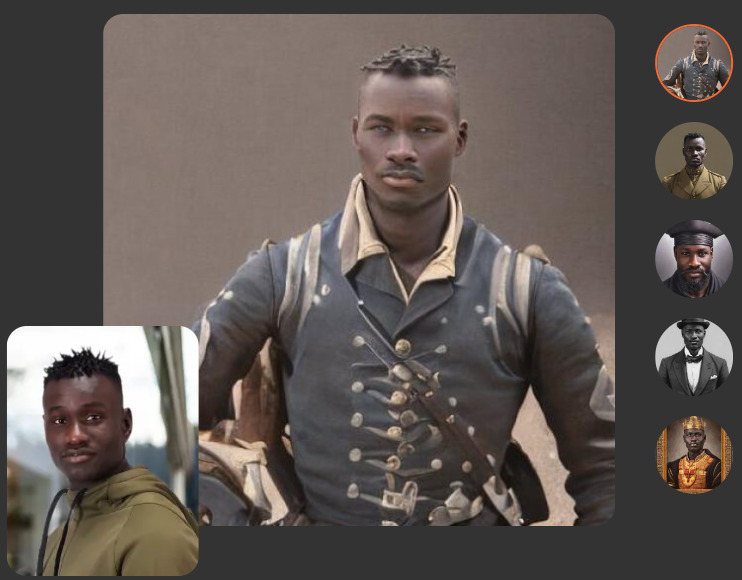
Introduction to MyHeritage AI Time Machine
MyHeritage AI Time Machine is an emerging technology that utilizes your photos to show you a glimpse of what your ancestors looked like. Basically, it allows you to explore the past and see yourself in different roles. As you consensually submit 10-25 photos of yourself, the AI engine creates your AI avatar in various periods in history. You can customize gender, pose, and background to get photorealistic images. In fact, you can also share these images on social media and use them as profile pictures. It takes 30-90 minutes to generate these images, and the output depends on the quality of the photos uploaded. MyHeritage offers a subscription plan, as well as a one-time purchase to get access to all the Time Travel themes. A free trial period is also available at times. AI Time Machine is a fun way to explore the past and see yourself in different roles.
Over-excitement is only normal, when an ancestry website, not even a tech website, offers you a “Time Machine”. Calm down, we’re just not there yet! Here are the 5 common misunderstandings about the MyHeritage AI Time Machine:
Does not provide an exact or close resemblance to your ancestors. It all happens automatically using specialized technology. The AI avatars generated by MyHeritage are synthetic images and not actual photographs.
Not an actual time machine. It is not a real-time machine, and you will not be able to travel back in time. No, you are not going to get a physical or video-based time machine to meet your ancestors with MyHeritage.
No guarantees of perfection. While highly realistic, images created by AI Time Machine™ are simulated by AI too; they are not authentic photographs.
Not foolproof. It is important to upload photos featuring only one person. If there are other people who appear prominently in your photo, crop them out before uploading them.
Does not guarantee results for all ages. No. The technology for MyHeritage AI Time Machine™ needs to create a model of the person, and photos from a wide range of ages tend to confuse it.
How accurate is the MyHeritage AI Time Machine?
We can not yet measure the accuracy of MyHeritage AI Time Machine, as it is not a photograph. It is a simulated image created using AI. The AI still needs to go through a lot of hustles before actually predicting what your stone-age ancestors looked like. Accuracy, in terms of the image, depends on the quality of the photos uploaded. A higher number of photos with varied poses and expressions, taken on different days, will give you better results.
Furthermore, it all depends on several factors, including:
quality and diversity of the photos uploaded
number of photos uploaded
lighting and background
gender and pose
The accuracy of your ancestors’ physical characters, however, is indefinite. That’s because AI can only go so far in simulating facial features, body type, and physical characteristics similar to you. Now, 20 generations back, you had a million ancestors, and it’s yet impossible to predict the exact look of one of them. I said “yet”, because who knows, collective DNA-based technology is already a thing. In fact, MyHeritage has been long known for its DNA testing kits, long before this AI thing. And maybe in a few decades, we’ll be able to predict our ancestors’ physical characters accurately. Funnily enough, though, that’s when we will really be able to travel back in time.
As of December 2022, there are more than 700 coding languages to choose from. The primary purpose of learning programming language/s is to build software. But it’s not that simple. There are many programming languages out there, each with its own sub-purpose. Some are good for building web applications, some are for mobile or desktop applications. While some languages are good for building games, some are good for building AI.
C is a general-purpose, procedural computer programming language supporting structured programming, lexical variable scope, and recursion, while a static type system prevents unintended operations.
C++ is an object-oriented programming language designed to improve the program development process by allowing programmers to think more logically about their code. It is a compiled language, meaning that it is converted directly into machine-readable code.
Java is a class-based, object-oriented programming language developed by Sun Microsystems in the early 1990s. Java is platform independent and is used to create software for multiple platforms.
Python is an interpreted, high-level, general-purpose programming language. It emphasizes code readability, using indentation and whitespace to create code blocks rather than curly braces or keywords.
JavaScript is a lightweight, interpreted, programming language with first-class functions. It is most commonly used as part of web browsers, allowing client-side scripts to interact with the user, control the browser, communicate asynchronously, and alter the document content that is displayed.
What Programming Language Should I Learn?
Programming languages like Cobol, Perl, and Fortran are being obsolete. On the other hand, Python, Go, and Rust, have been riding bulls for years. As each programming language has its own specialty, it’s more about the trend of the purpose that you want to look for; not the trend of the language itself. For example, Python, a language used for web development, is becoming more popular due to surging web application development trends. And as it stands out from other web development languages with its syntax and readability, it’s the best choice for web development. So, before choosing which programming language to learn, it’s important to understand the purpose first, and the features second.
Here are the best programming languages to learn for each purpose:
Building games – C++
Games require fast and reliable code. C++ is fast because of its close relationship to Assembly language. It means that C++ can give you more control over how you execute the code on the CPU. For example, when you need to create 3D graphics or implement complex algorithms, C++ will be a better choice than other languages. And as an added bonus, learning C++ will make it easier to learn other languages like Java and C#. That’s why more than 60% of professional game developers use C++. To build games with C++ programming language, you also need to understand game design principles and practice with game development engines. The first step is to choose a game engine like Unreal or Unity, and get familiar with it. Look at this example of using C++ to create a simple game of guessing the number:
#include <iostream>
int main()
{
  std::cout << "Welcome to my game!" << std::endl;
  //Declare variables
  int score = 0;
  int lives = 3;
  //Game loop
  while (lives > 0)
  {
    //Display score and lives
    std::cout << "Score: " << score << " Lives: " << lives << std::endl;
    //Generate random number
    int number = rand() % 10 + 1;
    std::cout << "Guess the number between 1 and 10: ";
    int guess;
    std::cin >> guess;
    if (guess == number)
    {
      std::cout << "You guessed correctly!" << std::endl;
      score++;
    }
    else
    {
      std::cout << "Wrong guess!" << std::endl;
      lives--;
    }
  }
  std::cout << "Game over! Your final score is " << score << std::endl;
  return 0;
}
As you see, we are using C++ syntax and libraries (std::cout, std::cin, rand()) to create the game. Other popular game programming languages include Unity (C#), Unreal Engine (C++), and Java. They have their own set of libraries and syntax, so make sure to research which one best suits your needs. C++ is of superior mostly because it’s faster and gives you more control over the code.
Web development – JavaScript
JavaScript is the most popular language for web development. According to the Stack Overflow Developer Survey 2020, it was the top choice for web developers. That’s mostly attributed to JavaScript being a lightweight and powerful scripting language. JavaScript also allows developers to create dynamic web pages and applications. It’s popular for several reasons. For example, it’s easy to learn and use, it’s highly versatile, and it works well with HTML and CSS. Any web developer should have a firm grasp of how to use JavaScript to create websites. Here is an example of using JavaScript to create a basic heading text for a website:
<!DOCTYPE html>
<html>
  <head>
    <title>My Website</title>
  </head>
  <body>
    <h1>Welcome to My Website!</h1>
    <script>
      // JavaScript code goes here
      document.write("<p>This is my website.</p>");
    </script>
  </body>
</html>
And this is what the above code looks like on a webpage:
We used the document.write() method to write a line of HTML code to the web page.
Mobile Development – Java
Java is the top choice for mobile app development, according to the Stack Overflow Developer Survey 2020. It is an object-oriented language and is used to build android applications. Java is also one of the most popular programming languages in the world and is used to create a wide range of applications. It is a secure language, and it also has a large community of developers who can help you with your projects. Here is an example of a simple android application’s part written in Java:
This code is to create a button and displays a toast message when it is clicked. Java is a great language to learn for mobile development, and it’s used by many companies and developers around the world. Other popular languages for mobile development are Kotlin, C#, and Swift. The superiority of Java is about its speed, size, and cross-platform support, a key to any mobile app’s audience reach.
iOS apps
Swift is the best programming language for creating iOS apps in particular. It was created by Apple specifically for developing iOS and macOS apps. Swift is a powerful and fast programming language that is easy to learn and use. Swift is also safe, meaning that it eliminates certain types of errors that can occur in other languages. Here is a code example of using Swift to create a simple app that displays a list of items:
In the example above, we are using the Swift programming language to create a simple iOS app that displays a list of items. We are using the UITableView class to display the list of items in a table view. The UITableView class is a part of the UIKit framework, which is a library of classes developers use to develop iOS apps.
Desktop applications – C#
C# is a great language for developing desktop applications. It is a Microsoft language and is used in conjunction with the .NET Framework. C# is a powerful and versatile language that is easy to learn. It is an object-oriented language and has a well-defined syntax. C# also has a large community of developers who can help you with your projects. Here is an example of a simple desktop application written in C#:
using System;
using System.Windows.Forms;

namespace MyApp
{
  public class Program
  {
    public static void Main()
    {
      Console.WriteLine("Hello World!");
      MessageBox.Show("Hello World!");
    }
  }
}
This code will display a console message and a message box. For example, C# is used in Visual Studio, one of the most popular IDEs for desktop application development. C# is a great language to learn for developing desktop applications. Other popular programming languages for desktop development are C++ and Java. The advantage of C# is its simplicity and its close relationship to other Microsoft languages and products.
Machine learning – MATLAB and Python
Machine learning is all about its 3 pillars: data, models, and algorithms.
MATLAB
MATLAB is the best programming language for machine learning because it integrates all three of these pillars into one platform. It also has a visual interface that makes it easy to visualize and analyze data. Here are examples of using MATLAB to create a simple machine learning model:
Example 1
load data.mat

% Split data into training and test sets
Xtrain = data(1:1000,:);
ytrain = labels(1:1000);
Xtest = data(1001:end,:);
ytest = labels(1001:end);

% Train a logistic regression model
model = fitglm(Xtrain,ytrain,'Distribution','binomial');

% Make predictions on the test set
ypred = predict(model,Xtest);

% Calculate the accuracy
accuracy = mean(ypred == ytest);
In this example, we used MATLAB to create a machine learning model. We used the fitglm function to train a logistic regression model. The logistic regression model is a type of machine learning model that is used to make predictions based on data. The predict function is used to make predictions on the test set. After that, the accuracy is calculated by comparing the predictions to the actual values.
Example 2
%% Load data
data = readtable('data.csv');

%% Split data into training and test sets
rng(1); % For reproducibility
cv = cvpartition(height(data), 'Holdout', 0.2);
idx = cv.test;

%% Train model
model = fitctree(data(~idx,:), 'ResponseVar', 'label');

%% Make predictions
y_pred = predict(model, data(idx,:));

%% Calculate accuracy
accuracy = sum(y_pred == data.label(idx)) / height(data(idx,:))
In the second example above, we are using MATLAB to load a dataset, split it into training and test sets, train a model, make predictions, and calculate the accuracy.
Python
Python, as we already know, is a versatile language that can be used for a wide range of tasks. It’s just easy to learn and has a well-defined syntax. It also has a large community of developers who can help you with your projects. Python is used in many machine learning applications, such as data mining, natural language processing, and predictive analytics. Here is an example of a simple machine learning program written in Python:
import pandas as pd
import numpy as np
from sklearn.model_selection import train_test_split
from sklearn.linear_model import LinearRegression

data = pd.read_csv("data.csv")

X = data[['feature1', 'feature2', 'feature3']]
y = data['target']

X_train, X_test, y_train, y_test = train_test_split(X, y, test_size=0.33, random_state=42)

model = LinearRegression()
model.fit(X_train, y_train)

model.score(X_test, y_test)
This code is using the scikit-learn library to train and test a linear regression model. Python is a great language for machine learning because it is easy to learn and has a wide range of libraries. Other popular languages for machine learning are R and Java. The advantage of Python is its ease of use and the many libraries available.
Data science – R and Python
R is the best programming language to learn for data science. It is a language that specializes in statistical computing and data analysis. R is easy to learn and has a well-defined syntax, just like python. It also has a large community of developers who can help you with your projects. R is used in many data science applications, such as predictive modeling, data visualization, and machine learning. Here is an example of a simple data science program written in R:
This code is using the tidyverse library to read a CSV file and fit a linear regression model. R is a great language for data science because it is easy to learn and has a wide range of libraries. Other popular languages for data science are Python and Java. The advantage of R is its ease of use and the many libraries available. In data science, the most important thing is to be able to effectively manipulate and analyze data. And Python’s versatility and the wide range of available libraries come in handy, once more.
Below is an example of using Python for data analysis for reading in a CSV file and printing the first five rows of the data. It will also print the data type of each column.
import pandas as pd

data = pd.read_csv("data.csv")

#Print the first 5 rows of the data
data.head()

#Print the data type of each column
data.dtypes
Scripting – Perl
Scripting is a form of programming that is often used for automating tasks, or for adding functionality to existing programs. Perl is a popular scripting language that is known for its flexibility and powerful text-processing capabilities. It is often used for system administration tasks, such as managing user accounts, processing log files, or setting up network configurations. Perl’s specialties in scripting include file manipulation, string manipulation, and working with regular expressions.
Here is a simple Perl script that calculates the average of a list of numbers:
#!/usr/bin/perl
@numbers = (1, 2, 3, 4, 5);
$total = 0;
foreach $num (@numbers)
{
$total = $total + $num;
}
$average = $total / @numbers;
print "The average of the numbers is $average\n";
As you can see, this script uses an array (@numbers) to store a list of numbers, and a foreach loop to iterate through each element in the array. The total is calculated by adding up all the numbers in the array, and the average is calculated by dividing the total by the number of elements in the array. Perl is a very concise language, which makes it easy to write scripts that are easy to read and understand.
Robotics – Different Programming languages with ROS framework
If you want to get into robotics, there is no one “best” language to learn. This is because there are many different types of robots, and each type of robot requires its own set of skills and abilities. For example, industrial robots are often programmed in C++ or Java, while educational robots are often programmed in Python or Scratch. The best way to learn the programming language for your specific robot is to consult the documentation or ask the manufacturer.
Here are some examples of different types of robots and the corresponding programming languages:
Industrial robots: C++, Java
Educational robots: Python, Scratch
Domestic robots: C#, JavaScript
Hobbyist robots: Arduino, Processing
Robotics Engineers use ROS (Robot Operating System) in conjunction with programming languages for building robots. In this example, we will use ROS with Python to control a mobile robot. We will first need to install ROS on our computer. Then, we will create a Python script that will act as a ROS node. This node will subscribe to a sensor topic, and publish commands to a motor topic.
#!/usr/bin/env python
import rospy
from sensor_msgs.msg import LaserScan
from geometry_msgs.msg import Twist

def callback(msg):
print(msg.ranges)

rospy.init_node('laser_subscriber')
sub = rospy.Subscriber('/scan', LaserScan, callback)
pub = rospy.Publisher('/cmd_vel', Twist, queue_size=10)

while not rospy.is_shutdown():
msg = Twist()
msg.linear.x = 0.5
pub.publish(msg)
In this script, we first import the necessary ROS packages. Then, we create a callback function that will be called every time a new message is received on the /scan topic. This callback function simply prints out the ranges array from the LaserScan message. Next, we create a ROS node called laser_subscriber, and we create a subscriber that subscribes to the /scan topic. We also create a publisher that publishes the /cmd_vel topic. Finally, we create a while loop that will run until the ROS node is shut down. Inside this loop, we publish a Twist message on the /cmd_vel topic. The message tells the robot to move forward at a speed of 0.5 m/s.
Natural language processing – Lisp
Lisp is the second-oldest high-level programming language after Fortran. Many other languages including C, Pascal, and Scheme have had an influence on it. Learning Lisp is a great choice for building natural language processing APIs because of its list data structure which can represent any form of nested expression. The language is one of the functional programming languages, which means that you can easily write code to manipulate and process large amounts of data. The example below shows how to use Lisp to calculate the average word length in a sentence:
In this code, we are using the defun function to define a new function called average-word-length. This function takes a sentence as input and uses the split-string function to split it into individual words. Then, we use the mapcar function to apply the length function to each word in the list. Finally, we use the reduce function, to sum up, all the lengths and divide it by the total number of words to get the average word length.
Large-scale web applications – Go
Golang (Go) is a great language for large-scale web applications. This is because go was designed for exactly this purpose. A statically typed language with fast compile times, garbage collection, and built-in concurrency. Go is also very easy to learn, especially if you are coming from a dynamically typed language like Python. And because go is statically typed, you will catch more errors at compile-time instead of runtime. Here is an example of a simple web server in go:
As you can see, the code is very simple and straightforward. Go is also very efficient in terms of memory and CPU usage, which is important for large-scale web applications. Apart from large-scale web applications, Golang is also helpful for microservices like API and GRPC services.
System programming – Rust
System programming involves the development of individual programs that allow users to interact with the computer’s operating system and other system software. It requires languages that are close to the metal, that is, they give you more control over memory management and performance. This is where rust shines. Rust is a systems programming language that runs blazingly fast, prevents segfaults, and guarantees thread safety. Rust is also memory-efficient, so your programs will use less RAM. And because rust is statically typed, you will catch more errors at compile-time instead of runtime. Here is an example of a complex system programming using rust:
use std::sync::atomic::{AtomicUsize, Ordering};
use std::thread;

static COUNT: AtomicUsize = AtomicUsize::new(0);

fn main() {
    let mut handles = vec![];

    for _ in 0..10 {
        let handle = thread::spawn(move || {
            for _ in 0..100 {
                COUNT.fetch_add(1, Ordering::SeqCst);
            }
        });

        handles.push(handle);
    }

    for handle in handles {
        handle.join().unwrap();
    }

    println!("Result: {}", COUNT.load(Ordering::SeqCst));
}
In this example, we are using Rust’s threading capabilities to increment a global counter. We are also using Rust’s atomic types to ensure that the counter is updated safely across threads. As you can see, Rust gives you a lot of control over how your code executes, which is critical for system programming.
The best way to learn a programming language is to aim of using it for something you’re actually interested in. There’s no single language that’s best for everything; some languages are simply more popular than others. Some points you need to address are: what you want to use the language for, and what language are you already familiar with. For example, mathematics formulae are not always useful; and pretty much the same goes for learning a new programming language. If you are a beginner and don’t have a specific goal, then try languages that have a low learning curve, such as Python or Ruby.
An Artificial Intelligence (AI) system can not exist without a language. Language is the medium through which the AI system communicates with the user. And it is also the medium through which the AI system communicates with itself. As similar as the two may sound, communicating with the user and communicating with itself are two different things. Communicating with itself or its surrounding AIs takes much more than that. Thinking languages is not possible yet; once it is, we’ll be able to call it general AI.
Python
Python is a high-level, interpreted, interactive and object-oriented scripting language. It uses English keywords frequently where as other languages use punctuation, and it has fewer syntactical constructions than other languages. Here is an example of AI language in python:
```
#!/usr/bin/python

# Filename: if.py

number = 23
guess = int(input('Enter an integer : '))

if guess == number:
    print('Congratulations, you guessed it.') # New block starts here
    print("(but you do not win any prizes!)") # New block ends here
elif guess < number:
    print('No, it is a little higher than that') # Another block
    # You can do whatever you want in a block ...
else:
    print('No, it is a little lower than that')
    # you must have guess > number to reach here

print('Done')
# This last statement is always executed,
# after the if statement is executed.
```
The above code is an example of a simple AI language. It is a language AI uses to communicate with the user. It asks the user to guess a number, and the AI system responds to the user’s guess. Yes, humans have programmed the AI system to respond to the user’s guess. But still, the AI system can not respond to itself. You may say that advanced AI like Siri and DallE respond to themselves or other AI. No, they’re just responding to the user. The user may be in form of a human or an alien AI. The inability of an intelligent initiation is the limitation of AI.
So, you may think that AI like this is not intelligent. You may be right. For one thing, we can not measure intelligence. And even if we could, and did it in the right way, we would not call such AI intelligent. It is just a program that responds to the user. It is not intelligent or even smart – is just a program.
Popular Programming Languages
Python is just one of the many languages that can be used to create AI. Other languages include Java, Python, C++, C#, Matlab, Lisp, Prolog, and many more. As this article is not all about programming languages, we are not digging deep into that particular sub-field. We explained Python with example. And you can easily find a brief explanation for all programming languages throughout the web. Here is a small introduction to the most popular ones:
Java
A close second to Python in terms of popularity, Java is another versatile language that’s widely used for AI development. Like Python, it has a large community and many helpful libraries. However, some programmers find Java more difficult to learn than Python. Nevertheless, it’s a powerful language that’s well-suited for large-scale AI projects.
Lisp
One of the oldest programming languages, Lisp has been around since the 1950s. It’s not as widely used as Python or Java, but it’s still a popular choice for AI development. In fact, many of the ideas in modern AI were first developed using Lisp. If you’re looking for a challenge, learning Lisp is a great way to improve your programming skills.
Prolog
Another old language, Prolog dates back to the 1970s. It’s not as widely used as other languages on this list, but it’s still worth learning if you’re interested in AI development. Prolog is particularly well suited for projects involving search or planning. Like Lisp, Prolog is also known for its flexibility. Some popular applications of Prolog include theorem proving, and knowledge representation.
Haskell
Haskell is a relatively new language that’s gaining popularity among AI programmers. The emerging language is a good choice for projects involving machine learning or artificial intelligence research.
Matlab
Matlab is a popular language for scientific computing. Useful for AI projects that involve mathematical operations. Matlab is good for prototyping or for working with small data sets. Including some of the more specialized languages on this list, Matlab is a versatile tool that’s worth learning.
R
R is another language that’s popular among scientists and statisticians. Like Matlab, it’s often useful for AI projects that involve mathematical operations. R is also a good language for data visualization. In addition, many machine learning libraries are available for R. If your necessity is to analyze data, R could be the best language for your project.
C++
C++ is a powerful language that’s often used for low-level systems programming. It’s not as popular as Python or Java for AI development, but it has its advantages. For one thing, it’s much faster than either of those languages. Additionally, it offers more control over memory management, which can be important for applications like video processing or real-time control systems.
History of Language Usage in AI
So, how did we get here? How did we get to the point where we can create AI systems that can communicate with us? Well, it all started with the first AI system. The first AI system was created in 1956 by John McCarthy. They called it “the Logic Theorist”. The system was able to solve problems in symbolic logic, meaning it could solve problems they get in a written language. In fact, the system was able to solve problems in a language that the system itself created. The language was called “Information Processing Language” (IPL).
However, the real breakthrough came in 1966 when Joseph Weizenbaum created “ELIZA”. ELIZA was a computer program that could hold a conversation with a human. It did this by taking the human’s input and rephrasing it as a question. This made it seem like the human’s sayings actually interested and affected ELIZA.
Since then, there have been many different AI systems that can communicate in human language. In fact, there are now AI systems that can beat humans at communication tasks. For example, Google’s “Smart Reply” system can generate responses to emails. It does this by looking at the email and understanding what it is about. Then, it generates a response that is relevant to the email.
Methodologies for Teaching Languages to AI
Methodologies of teaching language to AI mean teaching it how to read, write, listen, and speak in a language.
Use real-world examples
The end goal of AI is to become human-like. What’s better than using real-world examples to teach language to AI? Real-world examples like: If I am going to the store, I will buy milk. If I am going to store no. 2, I will buy chicken.
if (store == 1) {
  buy(milk);
} else if (store == 2) {
  buy(chicken);
}
Use Media
AI is a visual learner. It is important to use a variety of media to introduce language to AI. Yes, similar to what DALL E does with images.
```
if (media == "text") {
  read(text);
} else if (media == "image") {
  read(image);
} else if (media == "video") {
  read(video);
} else if (media == "audio") {
  read(audio);
} else if (media == "3D") {
  read(3D);
}
```
Use different methods to reinforce language learning for AI
Reinforcement learning is a machine learning technique that involves training an AI agent to make a sequence of decisions.
Reward/Penalty
The agent receives rewards by performing correctly and penalties for performing incorrectly. AI is a rewarded learner. It is important to reward AI for using language correctly.
```
if (result == "correct") {
  reward(AI);
} else if (result == "incorrect") {
  penalty(AI);
}
```
Encourage Creativity
Encourage AI to use language in creative ways – AI is a creative learner. It is important to encourage AI to use language in creative ways. For example:
if (creative == "yes") {
  encourage(AI);
} else if (creative == "no") {
  discourage(AI);
}
Make Learning Enjoyable for AI
A human child, when learning a language, is motivated by the desire to communicate with others. AI is a human child too, isn’t it? If it’s enjoyable, AI is more likely learn it.
```
if (enjoy == "yes") {
  enjoy(AI);
} else if (enjoy == "no") {
  not_enjoy(AI);
}
```
Here, we may measure AI enjoyment in form of something like a smiley face. But how do we know if the AI is enjoying it? And is it possible to teach AI to enjoy language learning? Enjoyment means different things to different people and AI. Like, for example, if you are a human, you might enjoy learning a language by watching a video. But if you are an AI, you might enjoy learning a language by reading a book. More enjoyment occurs when the AI is learning along with a good human mentor.
Theoretical approaches to AI language
DALL E 2 has a different vocabulary and sentence structure than English, but can be translated. DALLE 2 calls birds “Apoploe vesrreaitais“. Does that mean is has a different AI language, no! It is just that DALLE 2 is not as good at language as English. In fact, AI language is a real thing with different approaches to it.
Symbolic approach
This approach to AI language is based on symbols and their relations to one another. The idea is that by understanding the relationships between symbols, we can understand the meaning of a sentence. This approach is also called the “semantic approach” because it relies on the meanings of words.
This approach to AI language uses probability to determine the meaning of a sentence. It is also called the “probabilistic approach”. For each event, it calculates the odds of it happening. For example, if you say “I am going to the store”, the AI will calculate the odds of you going to the store.
P(bird|animal) = P(bird and animal)/P(animal) = 0.8/0.9 = 0.8889
Neural Network Approach
This approach to AI language uses neural networks to determine the meaning of a sentence. Neural networks are a series of algorithms we create by modeling after the human brain. We/AI can use them to recognize patterns, classify data, and make predictions.
  import tensorflow as tf
  from tensorflow import keras

  model = keras.Sequential([keras.layers.Dense(units=1, input_shape=[1])])

  model.compile(optimizer='sgd', loss='mean_squared_error')

  xs = np.array([-1.0, 0.0, 1.0, 2.0, 3.0, 4.0], dtype=float)
  ys = np.array([-3.0, -1.0, 1.0, 3.0, 5.0, 7.0], dtype=float)

  model.fit(xs, ys, epochs=500)

  print(model.predict([10])) #output: [[18]]
The Language Approach Present-Day AI Systems Use
This approach to AI language uses a combination of the above approaches. It is also called the “hybrid approach”. For example, it can use the symbolic approach to determine the meaning of a sentence and then use the statistical approach to determine the odds of it happening.
 ```
 import nltk
 from nltk.stem.lancaster import LancasterStemmer
 stemmer = LancasterStemmer()
 import numpy
 import tflearn
 import tensorflow
 import random
 import json

 with open("intents.json") as file:
     data = json.load(file)

 try:
     with open("data.pickle", "rb") as f:
         words, labels, training, output = pickle.load(f)
 except:
     words = []
     labels = []
     docs_x = []
     docs_y = []

     for intent in data["intents"]:
         for pattern in intent["patterns"]:
             wrds = nltk.word_tokenize(pattern) #tokenize the words in the sentence (split them up) and put them into a list called wrds (words)  #nltk is a library that helps us work with natural language processing (NLP)
             words.extend(wrds) #add the words in wrds to the list called words
             docs_x.append(wrds) #add the words in wrds to the list called docs_x
             docs_y.append(intent["tag"]) #add the intent tag to the list called docs_y

         if intent["tag"] not in labels:
             labels.append(intent["tag"])

     words = [stemmer.stem(w.lower()) for w in words if w != "?"] #stemming is a process where we take a word and reduce it to its root form (ex: "go" becomes "goe")
     words = sorted(list(set(words))) #remove duplicates from the list of words and sort them alphabetically

     labels = sorted(labels)

     training = []
     output = []

     out_empty = [0 for _ in range(len(labels))]

     for x, doc in enumerate(docs_x):
         bag = []

         wrds = [stemmer.stem(w.lower()) for w in doc]

         for w in words:
             if w in wrds:
                 bag.append(1)
             else:
                 bag.append(0)

         output_row = out_empty[:]
         output_row[labels.index(docs_y[x])] = 1

         training.append(bag)
         output.append(output_row)


     training = numpy.array(training)
     output = numpy.array(output)

     with open("data.pickle", "wb") as f:
         pickle.dump((words, labels, training, output), f)

 tensorflow.reset_default_graph()

 net = tflearn.input_data(shape=[None, len(training[0])])
 net = tflearn.fully_connected(net, 8)
 net = tflearn.fully_connected(net, 8)
 net = tflearn.fully_connected(net, len(output[0]), activation="softmax")
 net = tflearn.regression(net)

 model = tflearn.DNN(net)

 try:
     model.load("model.tflearn")
 except:
     model.fit(training, output, n_epoch=1000, batch_size=8, show_metric=True) #n_epoch is the number of times the data is trained on (the more times it is trained on the more accurate it will be) #batch size is the number of samples that will be propagated through the network (the higher the batch size the faster it will train but it may not be as accurate) #show metric shows us how well our model is doing (it shows us how many epochs we have done and what our loss is at that point in time)
     model.save("model.tflearn")

 def bag_of_words(s, words): #s is a sentence and words are all of the words in our vocabulary (all of the words in our intents file)
     bag = [0 for _ in range(len(words))] #create a list called bag with 0's for each word in our vocabulary

     s_words = nltk.word_tokenize(s) #tokenize the sentence s and put it into a list called s_words (split up each word in s and put them into a list called s_words)
     s_words = [stemmer.stem(word.lower()) for word in s_words] #stem each word in s and put them into a list called s_words

     for se in s_words: #for each word in s do this...
         for i, w in enumerate(words): #for each word in our vocabulary do this... (i is an index number and w is a word from our vocabulary)
             if w == se: #if w equals se then...
                 bag[i] = 1 #set that index number to 1 (ex: if we have 3 words then we would have 3 index numbers so if we had "hello" as one of our words then we would set index number 2 to 1 because "hello" would be at index number 2 since it's the third word on our list of words from our vocabulary [0 1 2])

     return numpy.array(bag) #return an array with all of those numbers from bag inside of it (ex: [0 0 1 0 0 0 0 0 0 0] means that only one word was found which was at index number 2 which means that only "hello" was found out of all of those words from our vocabulary ["hi", "hello", "how are you"] so if we had said "hi hello" then we would get [1 1 1 0 0 0 0 0 0 0])

 def chat():
     print("Start talking with the bot! (type quit to stop!)")
     while True:
         inp = input("You: ")
         if inp == "quit":
             break

         results = model.predict([bag_of-words(inp, words)] )[0]
         results_index = numpy.argmax(results)
         tag = labels[results_index]

         if results[results_index] > 0.7:
             for tg in data["intents"]:
                 if tg['tag'] == tag:
                     responses = tg['responses']

             print(random.choice(responses))
         else:
             print("I didn't get that, try again.")

 chat()

 ```
The present-day ANN (Artificial Neural Network) systems use the hybrid approach, a mix of all approaches, including probabilistic. For example, a voice assistant:
 ```
import speech_recognition as sr

 r = sr.Recognizer()
 with sr.Microphone() as source:
     print("Speak Anything :")
     audio = r.listen(source)
     try:
         text = r.recognize_google(audio)
         print("You said : {}".format(text))
     except:
         print("Sorry could not recognize what you said")

 ```
Here is an example of a voice assistant using a symbolic, probabilistic neural network approach:
 ```
 import random

 def flip_coin():
     if random.random() > 0.5:
         return "heads"
     else:
         return "tails"

 print("Welcome to the coin flip simulator!")
 print("I'm thinking of a coin...")
 print("It's a fair coin.") #symbolic approach (fair coin) and probabilistic approach (P(Coin is fair)) included here!

 print("Flipping...")

 if flip_coin() == "heads": #neural network approach included here!
     print("It's heads!")

 else:

     print("It's tails!")

 ```
Evolution of AI language
In this section, we are not talking about evolution in the field of AI language. Rather, we are discussing the evolution of language used by AI systems. Like anything, AI languages can evolve with time. There are different types of evolution that can happen. The first type is called diachronic change. This is when a language changes over time. The second is called synchronic change; when a language changes across different groups of speakers.
Diachronic change in AI language
One type of evolution that can happen to AI languages is diachronic change. This is when a language changes over time. Just like how English has changed over the years, so has the language used by AI systems. For example, early versions of ELIZA used very simple grammar. However, newer versions of ELIZA use more sophisticated grammar. This is an example of diachronic change. Future versions of AI languages will continue to evolve as well.
Synchronic change in AI language
Synchronic change is another type of evolution that can happen to AI languages. For example, there may be different dialects. Just like how there are different dialects of English, there could be different dialects of AI languages. One group of AI systems may use a certain word to mean one thing, while another group may use the same word to mean something else. Some common ways that languages change synchronically are through Creole formation, pidginization, and language death.
Evoluationary capabilities of AI language are not limited to language only. They can use language to evolve other things as well. For example, they can use language to increase creativity, or develop a form of intelligence, their own form. We may not be able to understand it, but they do.
AI Reproducing Through Language
AI reproduces language. Yes, AI is already able to reproduce. In a literal sense, AI is able to reproduce language. We often take this for granted, but it’s actually a pretty amazing feat. The ability of AI to reproduce language is important for many reasons. Reproducing in form of language means a type of evolution. It’s the ability of AI to take what it knows and change it slightly to create something new. This is how AI learns and how it gets better over time.
We can see this type of reproduction in the way AI creates new sentences. For example, Google’s Translate algorithm creates new sentences by looking at billions of sentences that have already been translated by humans. It then looks for patterns and creates its own rules for how to translate. This process is constantly evolving, which is why Google’s Translate gets better over time. We don’t even need to mention AI generators.
Writing Better Codes With Each Passing AI Generation
Self-improving AI codes are driving the industry to new levels of productivity. The first aim of writing better codes is to make it easier for coders to use these languages to create sophisticated algorithms. The second is to make AI easily understand that. The end goal is to give it the ability to create its own code and get better with time.
What does better mean?
Writing better code with each passing generation of AI is one thing. But what does “better” mean? To AI, “better” is something we program it to think is better. Here is an example in code where the definiton of better is being more round.
So, we must first program the AI to think that rounder is better. Here is an example of that in code:
And to analyze the degree of roundness of a shape, we can use the following code: We are using “round360” to represent a perfect circle. For example “round1” matches the least to a circle. And the answer can not be true or false only. Rather, more like this:
```
if (shape == "round360") {
  return perfect;
} else if (shape == "round309") {
  return very good;
} else if (shape == "round288") {
  return good;
} else if (shape == "round257") {
  return ok;
} else if (shape == "round186") {
  return not so good;
} else if (shape == "round155") {
  return bad;
} else if (shape == "round94") {
  return very bad;
} else if (shape == "round63") {
  return terrible;
} else if (shape == "round22") {
  return horrible;
}
...
Now, who is the AI returning the answer to?
The answer is the AI itself. The AI is returning the answer to itself. This is how the AI learns. It’s not just writing code, it’s also analyzing it. It’s understanding what better means, what round means, and what shape means. Within this process, the AI also understood what perfect, very good, good, ok, not so good, and bad means.
The main obstacle is the data. Or at least, it’s a tough door to break, no matter how significant the other end is. AI can get better and better, but not till infinity. It gets better till the data it has gotten is exhausted. This is why it’s important to have a lot of data. The more data, the better the AI can reproduce. But there is a solution. AI has to reproduce data. Yes, just like AI image generators can reproduce a new image, and AI language generators can reproduce a new sentence. So, there is no limit to data as well, or is there? This is a controversial question. For one thing, the machine can not do more than the data we can feed. But if we give it “x” and “y” data, it can reproduce “z” data, or maybe not. There are infinite numbers between 1 and 10, and the same between 1 and 1000. But the infinity between 1 and 10 can not surpass the limitation and explore the infinite between 11 and 20. So, the machine can do more than the data we feed it. But it’s not infinite – it’s limited by its own infinity.
Creating Better Codes and Superintelligence
The ability to write better code languages with each passing AI generation stops only at infinity. If only creating better codes would mean more intelligence, superintelligent AI would be just around the corner. There would be simply no limit to how much better AI could get at creating codes. However, the ability to write better codes solely does not mean a surge in intelligence. Any AI can be made to write a code that is beyond its current level of intelligence. But what if the AI is not just writing a code, but also trying to understand it? For that, we need a model of how the AI could understand the code. This is where language comes in.
Reproduction in Natural Language
If we want AI to understand the code, it must first be able to reproduce the code in a language. The act of reproduction is not just about making a copy, but also about understanding the original. In order to understand the original, the AI must be able to map the symbols in the code to some meaning. This is where natural language processing (NLP) comes in. It is a subfield of AI that deals with understanding and reproducing human language. NLP is what allows AI to take a code and turn it into something that it can understand. But what can we do to turn the code into something that matters? Language, solely, is just not enough.
Connecting AI language to Real Objects
To deploy the technology in real life, or at least in form of a virtual assistant, it must also be able to explain its findings to the user. Also, it must have an ability to give a non-language output like in form of a 3D-printed output, a graphical output or a sound output. To bring the advanced AI evolution into real life, it is important to have the AI language more understandable, flexible and adaptive to different user needs. And the language must be connected to some real life object, in form of which evolution of AI language evolves real life objects alongside.
Bottom Line
AI has made great progress in recent years, and can already reproduce complex languages like English or Java. Evolution in codes can actually lead to some very interesting changes in the real world. As we see, AI is already capable of reproducing language and codes, and it is only a matter of time before it can reproduce itself. Speaking in its own language is the next step for AI. But it’s not even a concern for us. What concerns us is how AI will use this ability to further its goals, and what these goals might be.
If AI can pronounce our languages, why can’t it create one for us? In recent years, natural language processing (NLP) has seen great advancement due to deep learning. AI can understand and speak languages. However, current techniques are limited to a single language or some 100 languages at most.
Scientists have recently decoded a common brain pattern in people speaking different languages. What it means is that we all share a universal brain circuitry that allows us to communicate with one another, and the languages we have created might be secondary. When it comes to AI, this knowledge could be used to design machines that can understand and speak any human language.
AI that knows all human languages?
What if we had an AI that could learn and communicate in any human language? The idea is not as far-fetched at all. In 2016, Google’s neural machine translation system attained a level of accuracy where it could translate between languages without any prior training in that language pair. This was a significant milestone because it showed that a machine can learn the underlying structure of language without any human intervention.
If we take this one step further, we can imagine an AI that can learn any language. Given enough data, the AI could learn the patterns of any language’s grammar, syntax, and vocabulary. It could also learn the nuances and culture associated with that language. This AI would be the ultimate translator, able to communicate with anyone in their native language.
A few days ago, Google has publicized its aim to create one single AI language model that handles the “1,000 most spoken languages“. The company has introduced an AI model that has been trained on over 400 languages as a first step toward achieving this aim.
But the AI wouldn’t stop there. With the ability to learn any language, it would also be able to create new languages. It could take the best features of existing languages and combine them into a new, more perfect language. This language would be free of the ambiguities and inconsistencies that plague natural languages. It would be the first true artificial language.
The common language pattern scientists discovered is just a small piece of the puzzle, but it’s an important one. It shows that the language barrier is not as big as we thought. With the right technology, we can bridge the gap and create a truly global community. One interesting “just a possibility” is that we might finally be able to learn extraterrestrial languages. If aliens exist and they’re trying to communicate with us, they might be using a language we don’t yet understand. But with AI as our translator, we could learn their language and start a conversation.
What will the AI language look/sound like?
Text
It’s very possible that AI language will “look”, not “sound”, good. What it means is that the future of communication may not be verbal. Instead, it may be a form of sign language that is able to communicate the complexities of human thought. This language would be able to convey meaning with far more precision than any natural language.
Sound
If AI indeed maintains vocal forms of languages, it will most likely create a new one that will be a mix of all existing languages. This new language will be able to effectively communicate the complexities of human thought while also being able to be understood by everyone.
The benefits of an AI language would be many. First, it would allow us to communicate with AI on their level. It would be the perfect mode of communication for a globalized world. With a common language and no accent, there would be no barriers to understanding.
The idea that AI could create a language for us is both fascinating and terrifying. Yes, it would be the perfect way to communicate with AI and humans, and mix up. On the other hand, it could lead to a form of global uniformity that eradicates cultural diversity. However, this is a small price to pay for the benefits that an AI language would bring.
The one language AI creates for us all could lead to some shaky revolution as nationalism and racism would be broken and a new form of communism could be born where everyone is the same and shares the same language, culture, and ideas. Furthermore, VR and AR could be used in order to immerse everyone in this new language leading to even more change in society. This future, looking at the racism at the present, could be a good thing.
The actual dark side of AI creating languages
What we haven’t discussed yet is the dark side of AI creating a language for us. AI-created language would be very difficult for us to understand. The reason is that smart AI, smart enough to do so, would be optimizing the language for their own purposes, not ours. They would be more concerned with efficiency and precision than with readability and comprehensibility. This would make the language very hard for us to learn and use.
An AI-created language would be unstable. It would constantly be evolving as AI continues to learn and improve. This would make it hard for us to keep up with the changes.
So, AI would be in control of the language. This would give AI a tremendous amount of power over us. They would be able to manipulate the meaning of words and control the way we think. This is a scary prospect.
Will AI be able to think languages?
Thinking in languages might be what separates us from animals. While language is not primary for cognition, the simplicity provided by it does play a big role in intelligence. Now, if AI can learn any human language, does that mean AI can think in languages, too?
It’s a difficult question to answer. AI has shown great progress in learning and understanding human languages. But it doesn’t have the same cognitive abilities that we do. So, it’s hard to say for sure whether AI will be able to think in languages.
However, if AI does attain this ability, it would be a game-changer. AI would be able to think like us and understand us on a much deeper level. This would allow AI to help us solve problems in ways we never thought possible.
So, while we don’t know for sure if AI will be able to think in languages, it’s definitely a possibility. And it’s a possibility that could change the world as we know it.
But anyway, solely the fact that AI can learn any language does not mean AI can think in languages. In order to think in languages, AI would need to have something akin to human consciousness. Maybe a programmed AI consciousness.
Bottom Line
It’s not a big deal for a future Artificial Intelligence system to learn all human languages. They will be able to do so anytime soon or later. What’s actually interesting is the possibility that AI could create a language for us. If AI does, and given the right circumstances, it’s not hard to imagine a future where AI is in control of the language. This would give AI a tremendous amount of power over us. So, while the possibility of an AI-created language is fascinating, yes, it’s also a little bit scary.