Author: Britney Foster

  • Digital Identity and Examples

    Digital Identity and Examples

    Our identification, along with currency, residence, and education, has become digital. China has the largest digital population with 1.02 Billion daily internet users. That’s followed by India (658M), the US (307M), and Indonesia (204M). Digital identity is what people use to prove who they are in the digital world. According to biometrica, in 2021, 90% of toddlers started using the internet by the age of two. And that number is growing with each passing year. By 2026, more than 6.5 billion people will be utilizing it in one way or another. Examples include social media accounts, email addresses, bank accounts, and many more. In the past, physical documents were the only way to prove identity. But now, digital is becoming the new default. But the real question is, what is the actual, and complete definition of digital identity?

    Definition of Digital Identity

    Digital identity is a collection of personal information which people use to prove their identity online. This data can include biometric information or digital presence on a webpage. It can also include a person’s digital footprint. The internet is filled with the digital identities of people, such as emails, social media accounts, and online accounts. Currently, there are 97 zettabytes of data in the world. All these digital identities are not only useful, but necessary, for authentication, identification, and authorization, in this digital age. Without digital identity, it would be impossible to conduct bank transactions or buy products online. That’s why it is essential for us all to understand digital identity and its examples. At the same time, protecting our digital identity should be of utmost importance.

    Examples of Digital Identity


    Digital Footprints

    Digital footprints create your image online. And there are pros and cons to having an online image. For example, many companies use digital footprints to look into potential employees. But it also opens you to cyber-attacks. Especially teens are careless and share much more than they should. According to our research, people aged 21 to 48 were more aware of their digital identity and took more care of it. 48 to 60 aged people were slowly adapting and becoming more cautious. 60+ were less careful than 21-48, but more than 48-60. And teens were the most careless. Here are the types of digital footprints:

    a. Website comments

    For example, if you leave a comment on some website, you leave your name, picture, website, and email address, which creates a digital identity. Anyone can use this information to find out more about you.

    leaving a digital footprint as a comment
    Image credits: backlinko

    b. Social media

    Social media is the biggest source of digital footprints. You share your personal information, pictures, videos, and much more on social media. And it’s not just you who shares your information, but also your friends and family members. If you want to use social media but still want anonymity, then use Reddit.

    c. Online shopping

    When you buy something online, you leave a digital footprint. You share your name, address, credit card information, and more. Especially while posting reviews on online stores, you create a digital identity. This for example:

    leaving a digital footprint as a review
    Image credits: Amazon

    Email Address

    Your email address also creates a digital identity for you. It’s your unique identifier that allows people to send emails directly to you or contact you with other methods like phone or chat apps. For example, if you use Outlook, your email address will be something like [name]@outlook.com. And anyone who knows your email address can find out more about you by looking at your profile picture, name, and other information you’ve shared. Email is one of the oldest methods of having a digital identity. Here are some statistics:

    a. Only 29% of people use Gmail for their email addresses worldwide.

    b. In the US, 53% use Gmail, 18% use Yahoo!, and 14% use Outlook.

    c. There are 4 billion daily email users. The daily number of users using the internet is 4.95 billion.

    Email is one of the most anonymous ways of creating a digital identity. Other methods like social media, websites, and online reviewing are much more vulnerable. In fact, email is the only way to have a digital identity without the obligation to share any personal information. The only con of having an email address, if there is one, is that you may get malicious emails. So, just get a little careful while sharing your email address online.

    Username/Password

    Usernames and passwords are the most common form of digital identity. You create a username and password every time you register on a website. This allows you to log in to the website anytime and access its services. Usernames and passwords are used to protect your data from unauthorized access. Here are some tips for creating strong usernames and passwords:

    a. Username – Make sure it’s unique, not easily guessable, and related to your interests or activities.

    b. Password – Make sure it has at least 8 characters with numbers, special characters, uppercase letters, and lowercase letters…

    c. Change your password regularly – It’s important to change your password regularly to keep your account safe from hackers or other malicious activities

    Digital Certificates

    Google's digital SSL certificate
    Google’s digital SSL certificate

    Digital certificates are like digital passports. They are used to verify your identity online. For example, when you open a bank account or make a purchase online, the company will ask you to provide a digital certificate. The certificate is issued by a third-party authority and it contains all the necessary information about you like your name, address, and other details. Here are the types of digital certificates:

    a. SSL certificates – Secure a website and ensure that all the data transferred between the user and the website is encrypted.

    b. Digital signatures – Used to sign electronic documents such as contracts, agreements, and more.

    c. Identity cards – Government or companies issue them to verify your identity online.

    Digital certificates are used to protect your identity online. When you make a purchase or open an account, the company will ask you to provide a digital certificate as proof that you are who you say you are. This ensures that your data is safe and secure.

    Digital Identity Verification

    Digital KYC

    Digital identity, again, is an online or electronic version of your physical or real identity. So, like your physical identity, you need to prove your digital identity too. For example, when you open a bank account, you need to provide KYC documents like your passport, driver’s license, or utility bills. This is to ensure that you are who you say you are and that your data is safe with the bank. The same goes for other online services like opening an investment account or applying for a loan. Digital KYC is the process of providing KYC documents online. You can upload them on the website or app of the service provider. This is convenient and fast as you don’t have to go through the hassle of physically sending the documents. The method is just as secure as the company you’re providing these documents to.

    IP Address

    An IP address is a unique identifier that is assigned to your device when you connect to the internet. It allows your device to communicate with other devices and websites. For example, when you visit a website, the website will use your IP address to send the data to your device. And when you make a purchase online, the store will use your IP address to verify your location and prevent fraud. So, it is a form of digital identity. Your IP address can also be used to track your online activity. And if you’re not careful, it can lead to identity theft or other cyber crimes. Here are some tips to protect your IP address:

    a. Use a VPN – A VPN (Virtual Private Network) encrypts all the data transferred between your device and the internet. This protects your data from being intercepted by hackers or other malicious actors.

    b. Use a proxy server – A proxy server hides your real IP address and assigns you a new one. This makes it difficult for others to track your online activity.

    c. Use Tor – Tor is free and open-source software that encrypts your data and routes it through multiple servers before reaching its destination. This makes it difficult for anyone to track your online activity.

    Biometrics

    You must be familiar with play store apps that ask you to set up a fingerprint or facial recognition to log in. That’s biometrics. It is the process of verifying your identity with the help of physical or behavioral characteristics. For example, your fingerprint, iris, or face can be used to verify your identity. Similarly, your voice, signature, or gait can also be used for verification. Biometrics is more secure than other methods like username and password as it’s difficult to fake biometrics. Moreover, it’s more convenient as you don’t have to remember any passwords. Just use your fingerprint or face to log in to the app.
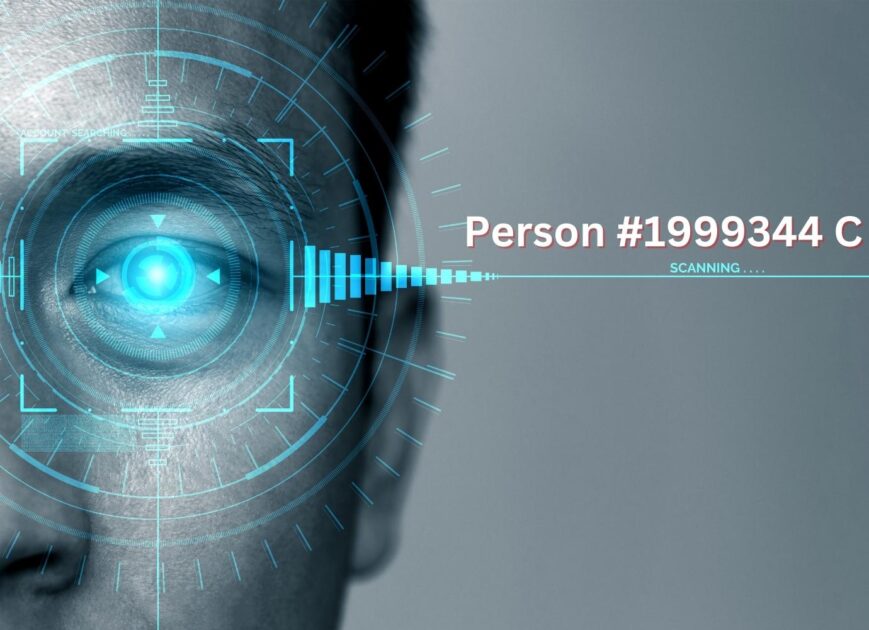
    Digital biometrics scanning

    As of December 2022, 245M Americans use biometric technology on their smartphones. This method of digital identity is slowly becoming popular as it’s more secure and convenient. However, the wrong hands can still misuse it. You may be wondering “how!”. Well, misusing biometrics is easier than you think, and as dangerous as easy it is. For example, if a hacker gets hold of your fingerprint, it’s not that they can use it to unlock your phone and access all your data. Rather, they can use it to make fake fingerprints and access other devices and services that you’ve authorized with your fingerprint. So, be careful while sharing your biometrics online.

    How to Protect Your Digital Identity?

    There are many things to protect your digital identity from. The most common practice is to use strong passwords. A strong password is a password that is at least eight characters long and includes a combination of uppercase and lowercase letters, numbers, and symbols. It is also important to never use the same password for more than one account. Another way to protect your digital identity is to never click on links in emails from unknown senders. These links could be malicious and lead to identity theft. Finally, it is important to limit the amount of personal information you share online. The less information you share, the less likely you are to be a victim of identity theft. Send KYC documents only where it is absolutely required. Keep your credit card away from any websites that do not have a valid SSL. Don’t over-share on social media.

    Conclusion

    Digital identity is important in today’s world as more people have accessed the internet than ever before. It’s important to take care of our digital identity as much as we can, without completely disappearing from the internet. Try to understand how it can be used for better or worse. Awareness of digital identity is the key to protecting ourselves online.

  • How Mixed Reality Works

    How Mixed Reality Works

    Chapter 1: Fundamentals

    This is how mixed reality works:

    The user experiences the real-world environment through their senses, such as sight and sound.
    The user interacts with the environment using a device such as a headset, controller or glove.
    The device captures the environment and processes it using sensors and algorithms.
    The device adds digital content to the environment, such as 3D objects, holograms, images, and text.
    The user interacts with the digital content, which responds to their actions in real time.
    The user experiences the digital content as part of the environment, creating a mixed reality.

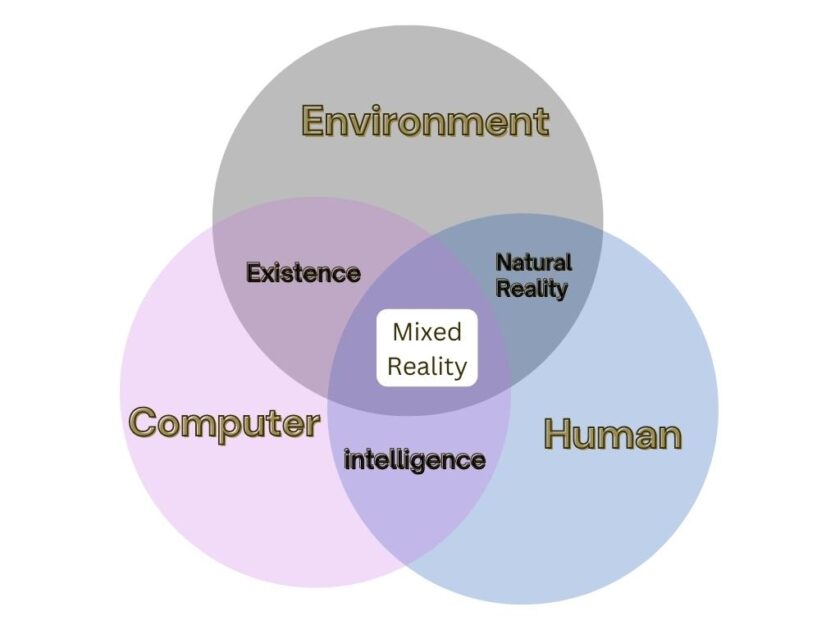
    Mixed Reality combines real and digital worlds to create new experiences. In the physical world, we know of 118 elements. Some of them are essential for life, such as oxygen, nitrogen, and carbon. In the virtual world, too, there are different sets of elements. We have not named them yet, but they exist. As Mixed reality combines the real and virtual elements, it overlaps a number of elements from both sides. Here is the definition of mixed reality in form of a Venn diagram:

    definition of mixed reality in form of a venn diagram
    A Venn diagram overlapping computer, humans, and environment

    Something that exists inside mixed reality has to first exist physically. So, something that is digital is firstly physical, then digital. Even digital elements are a part of the physical world, they just exist in a different form. For example, in the physical world, we have the objects we interact with, such as trees, rocks, and buildings. In the virtual world, we create digital versions of these objects, such as 3-D models of trees, rocks, and buildings. By overlapping these two elements, we get digital objects that exist in both the physical and virtual worlds. This is what a mixed reality experience is.

    Chapter 2: MR Disrupting Digital Devices and VR

    Mixed reality is about replacing smartphones and PC as our digital partners. We currently spend most of our time on screens anyways. Mixed reality is a better side-by-side alternative to it. According to a 2017 study, 48% of people are only used-to to digital devices, but do not think that technology has really made a positive difference in the past 50 years. Mixed reality technology could help reduce that number by more than half. For anyone who wants to take a break from reality, choose something like this instead of VR platforms like Oculus. With Mixed Reality, you can enjoy an enhanced visual experience that is real. The way Mixed reality is disrupting touch-screen smartphones, but also surpassing VR, especially as VR is still new; fantastic.

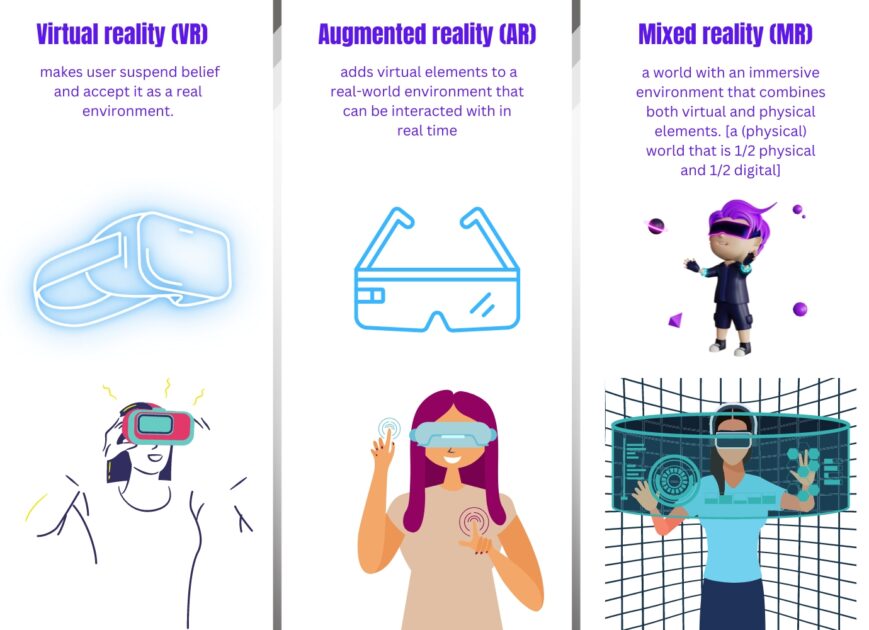
    Virtual vs Augmented vs Mixed Reality

    Mixed reality technology is estimated to increase customer engagement by up to 37% by 2030. In fact, 86% of the buyers are willing to pay more for a better customer experience. And mixed reality offers far better customer services than any other practical alternative, or at least for 73% of the buyers. There is no reason why companies would build VR headsets for gaming, instead of building Mixed reality platforms, where customers actually convert. 80% of customers who used augmented technology said that it helps them to understand a product better. If they understand it better, they simply buy more.

    Mixed Reality Replaces:

    Mixed Reality replaces:

    Field Replace With
    Education Textbooks Interactive 3D world
    Healthcare In-person visits Virtual medical visits
    Gaming Traditional video games Immersive gaming experiences
    Retail Brick and mortar stores Virtual or augmented showrooms
    Design 2D drawings 3D models and simulations
    Marketing Print and digital ads Interactive experiences
    Manufacturing Analog machines Digital workflows
    Entertainment Traditional movies Immersive storytelling
    Tourism In-person visits Virtual tours
    Real Estate Site visits Virtual showrooms

    Chapter 3: Mixed Reality Glasses

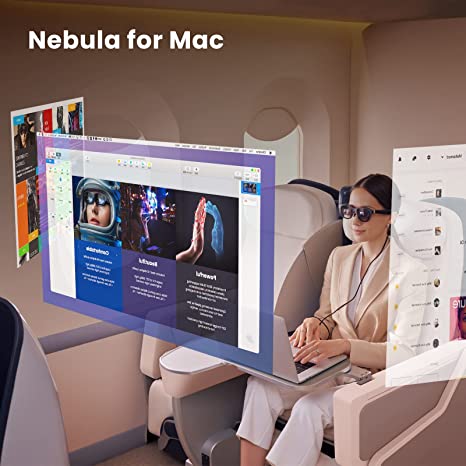
    One good thing about mixed reality is its glasses. They are actual glasses and not headsets like VR. Augmented reality and mixed reality are not the same, but we can use the terms “AR headset”, and “MR headset” synonymously. That’s because mixed reality is all about using augmented glasses to blend the physical and virtual worlds. Mixed reality glasses are 5-9 times lighter than VR headsets. Have a look at these Neal Air Glasses from Amazon:

    Nebula AR glasses

    Pretty awesome, ain’t it? However, before buying any mixed reality glasses, look at the authenticity. Nreal Air glasses are TÜV Rheinland Group-certified for low blue light, flicker-free, and eye comfort. Unauthentic glasses can cause eye strain and headaches. That, of course, is what you don’t want Mixed Reality as. There are enough headaches in the real life. For best 3D viewing, turn on Mixed Reality Viewer mode and be ready to enter an alternate reality. This mode supports object tracking, allowing users to interact with virtual objects in 3D.

    A more detail-oriented person may not be pleased with the quality of any mixed reality glasses. And for them, apple is going to release one the following year. Yes, we have made a separate article for that, make sure to check it out.

    Chapter 4: Engineering

    The engineering of mixed reality works like this: create, capture, analyze, process, and display data.

    Engineering MR

    The most advanced MR headsets feature a combination of optical displays and motion tracking sensors. The displays are typically LCD or OLED screens that allow for a wide field of view, while the motion tracking sensors allow for precise tracking of the user’s head and hand movements. In addition, many MR headsets also include specialized audio and haptic feedback systems, allowing users to feel vibrations or other tactile feedback. In order to create a truly immersive and interactive experience, mixed reality headsets must be ergonomic and comfortable. This includes lightweight materials and designs, as well as adjustable straps and padding to ensure a secure and comfortable fit. Mixed reality headset creators also pay special attention to temperature control, as they can generate a significant amount of heat while in use. A powerful graphics card is certainly important. The internal cooling system prevents overheating and maximizes user comfort.

    Chapter 5: Mixed Reality Economy

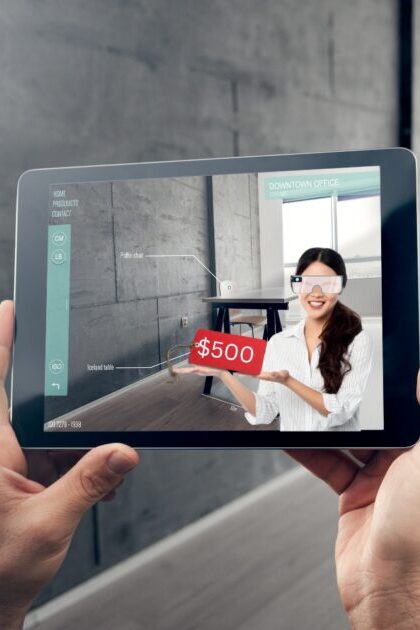
    buying and selling in mixed reality

    In mixed reality, the economy changes its norms. Buying and selling are different in mixed reality than in the normal, real world. Not only that you use digital currencies to pay, but you also buy digital assets. As the worlds of virtual and physical reality become increasingly intertwined, new markets are born. Companies now offer digital goods, services, and experiences to consumers. Consumers can purchase virtual assets such as digital collectibles, virtual goods, and virtual currencies. One can also buy, trade, and earn digital goods and services within the new economy. Businesses in the mixed reality economy are already using crypto as payment for goods and services. The average cost of creating a product is $30,000. Mixed reality reduces that by up to 20% as it lowers the cost of prototyping and testing. This helps businesses increase profitability and reach more customers; and in the long term, create better products.

    Chapter 6: Privacy

    Privacy is a concern for initial adopters of mixed reality. Privacy works by first understanding the data being collected as mixed reality blends a lot of things. Sensors, cameras and other devices track user info and movements. User consent is necessary. Data is then encrypted and stored securely. Data can be shared with third parties, but user control is still the key. As the overall field of wearable technology matures, privacy concerns are completely surrounding these fields. In fact, it is now a priority for the makers of such technology. Mixed reality privacy is enforced by having user control options, data encryption, and secure storage. Currently, almost one-fourth of the US population uses AR at least once a month. As more people get used-to to mixed reality, the concern for privacy will reduce. That’s just like the way people accepted the internet and its risks.

    Chapter 7: Mixed reality software

    We talked enough about the hardware part of mixed reality. But what about the software, the actual brain of the body, the most important part? MR software enables immersive experiences with a proper combo of specialized software, hardware, and AI algorithms. Cameras capture user movements and generate 3D models. These models interact with virtual objects. Simultaneously, audio and visual feedback are provided. This helps create an interactive and engaging experience. AI algorithms allow for real-time interactions, creating a more realistic environment. The user can interact with the virtual environment, also making it more enjoyable. MR software is used in gaming, training, and other applications. It will continue to evolve, creating more immersive and engaging experiences.

    Now, how does the software work? Different sub-fields of AI play a key role in Mixed reality software.

    Image recognition algorithms identify objects:

    ```
    import cv2
    import numpy as np
    
    img = cv2.imread('image.jpg')
    gray = cv2.cvtColor(img, cv2.COLOR_BGR2GRAY)
    
    sift = cv2.xfeatures2d.SIFT_create()
    kp = sift.detect(gray,None)
    
    img=cv2.drawKeypoints(gray,kp,img)
    
    cv2.imwrite('sift_keypoints.jpg',img)
    ```

    Natural language processing helps interaction:

    ```
    import nltk
    from nltk.stem.lancaster import LancasterStemmer
    stemmer = LancasterStemmer()
    
    import numpy
    import tflearn
    import tensorflow
    import random
    import json
    
    with open("intents.json") as file:
        data = json.load(file)
    
    try:
        with open("data.pickle", "rb") as f:
            words, labels, training, output = pickle.load(f)
    except:
        words = []
        labels = []
        docs_x = []
        docs_y = []
    
        for intent in data["intents"]:
            for pattern in intent["patterns"]:
                wrds = nltk.word_tokenize(pattern)
                words.extend(wrds)
                docs_x.append(wrds)
                docs_y.append(intent["tag"])
    
            if intent["tag"] not in labels:
                labels.append(intent["tag"])
    
        words = [stemmer.stem(w.lower()) for w in words if w != "?"]
        words = sorted(list(set(words)))
    
        labels = sorted(labels)
    
        training = []
        output = []
    
        out_empty = [0 for _ in range(len(labels))]
    
        for x, doc in enumerate(docs_x):
            bag = []
    
            wrds = [stemmer.stem(w.lower()) for w in doc]
    
            for w in words:
                if w in wrds:
                    bag.append(1)
                else:
                    bag.append(0)
    
            output_row = out_empty[:]
            output_row[labels.index(docs_y[x])] = 1
    
            training.append(bag)
            output.append(output_row)
    
    
        training = numpy.array(training)
        output = numpy.array(output)
    
        with open("data.pickle", "wb") as f:
            pickle.dump((words, labels, training, output), f)
    
    tensorflow.reset_default_graph()
    
    net = tflearn.input_data(shape=[None, len(training[0])])
    net = tflearn.fully_connected(net, 8)
    net = tflearn.fully_connected(net, 8)
    net = tflearn.fully_connected(net, len(output[0]), activation="softmax")
    net = tflearn.regression(net)
    
    model = tflearn.DNN(net)
    
    try:
        model.load("model.tflearn")
    except:
        model.fit(training, output, n_epoch=1000, batch_size=8, show_metric=True)
        model.save("model.tflearn")
    
    def bag_of_words(s, words):
        bag = [0 for _ in range(len(words))]
    
        s_words = nltk.word_tokenize(s)
        s_words = [stemmer.stem(word.lower()) for word in s_words]
    
        for se in s_words:
            for i, w in enumerate(words):
                if w == se:
                    bag[i] = 1
                
        return numpy.array(bag)
    
    
    def chat():
        print("Start talking with the bot (type quit to stop)!")
        while True:
            inp = input("You: ")
            if inp.lower() == "quit":
                break
    
            results = model.predict([bag_of_words(inp, words)])
            results_index = numpy.argmax(results)
            tag = labels[results_index]
    
            for tg in data["intents"]:
                if tg['tag'] == tag:
                    responses = tg['responses']
    
            print(random.choice(responses))
    
    chat()
    ```

    Machine learning algorithms improve the user experience:

    ```
    import numpy as np
    import pandas as pd
    import matplotlib.pyplot as plt
    import seaborn as sns
    %matplotlib inline
    
    from sklearn.model_selection import train_test_split
    from sklearn.preprocessing import StandardScaler
    from sklearn.neighbors import KNeighborsClassifier
    from sklearn.metrics import classification_report,confusion_matrix
    
    df = pd.read_csv('Classified Data',index_col=0)
    df.head()
    
    scaler = StandardScaler()
    scaler.fit(df.drop('TARGET CLASS',axis=1))
    scaled_features = scaler.transform(df.drop('TARGET CLASS',axis=1))
    df_feat = pd.DataFrame(scaled_features,columns=df.columns[:-1])
    df_feat.head()
    
    X = df_feat
    y = df['TARGET CLASS']
    
    X_train, X_test, y_train, y_test = train_test_split(X, y, test_size=0.30, random_state=101)
    
    knn = KNeighborsClassifier(n_neighbors=1)
    knn.fit(X_train,y_train)
    pred = knn.predict(X_test)
    
    print(confusion_matrix(y_test,pred))
    print(classification_report(y_test,pred))
    
    error_rate = []
    
    for i in range(1,40):
        
        knn = KNeighborsClassifier(n_neighbors=i)
        knn.fit(X_train,y_train)
        pred_i = knn.predict(X_test)
        error_rate.append(np.mean(pred_i != y_test))
    
    plt.figure(figsize=(10,6))
    plt.plot(range(1,40),error_rate,color='blue', linestyle='dashed', marker='o',
             markerfacecolor='red', markersize=10)
    plt.title('Error Rate vs. K Value')
    plt.xlabel('K')
    plt.ylabel('Error Rate')
    
    knn = KNeighborsClassifier(n_neighbors=17)
    
    knn.fit(X_train,y_train)
    pred = knn.predict(X_test)
    
    print('WITH K=17')
    print('\n')
    print(confusion_matrix(y_test,pred))
    print('\n')
    print(classification_report(y_test,pred))
    ```

    For a mixed reality system to operate properly, all three of these elements need to be in sync. Together, they enable the application to recognize and interact with the world around it. For example, it might recognize a chair, understand your command to sit down, and then take the appropriate action. If true mixed reality is achieved, the software needs to be able to understand the environment and the user’s needs. Apart from the above three, this requires additional elements such as 3D mapping, motion capturing, and facial recognition. Smartphones and other devices are already using facial recognition and motion capture, and 3D mapping is a technology in development.

    3-D modeling for mixed reality using Unity engine

    public class MixedRealityController : MonoBehaviour
    {
        // Reference to the camera in the scene
        public Camera camera;
    
        // Reference to the 3D object in the scene
        public GameObject 3DModel;
    
        // Reference to the MixedRealityToolkit object
        public MixedRealityToolkit mrt;
    
        void Start()
        {
            // Initialize the MixedRealityToolkit
            mrt.Initialize();
    
            // Create a 3D model in the scene
            GameObject model = GameObject.Instantiate(3DModel);
    
            // Position the 3D model in the scene
            model.transform.position = camera.transform.position + camera.transform.forward * 3f;
    
            // Set the scale of the 3D model
            model.transform.localScale = new Vector3(1f, 1f, 1f);
    
            // Set the rotation of the 3D model
            model.transform.rotation = camera.transform.rotation;
        }
    }
    
    ```

    The above example is of a script that creates a 3D model in the scene, positions it in the scene, and sets its scale and rotation according to the camera position and orientation. This is a key step in creating mixed reality applications. Other steps that are needed include setting up an appropriate lighting system, adding colliders, and setting up the appropriate interactions for the user.

    Conclusion

    Yes, it is a great idea, but only as long as privacy is a priority. Other than that, mixed reality is pretty much, disrupting smartphones, VR, and reality itself. Especially with the help of evolutionary algorithms, and data-driven simulations, mixed reality is here to evolve; not only to stay. We can never overlook the hardware potential of this technology either. Sharp graphics, smooth movements, and an immersive experience all make reality better when mixed.

  • What does a Full Virtual Reality Game System Look Like?

    What does a Full Virtual Reality Game System Look Like?


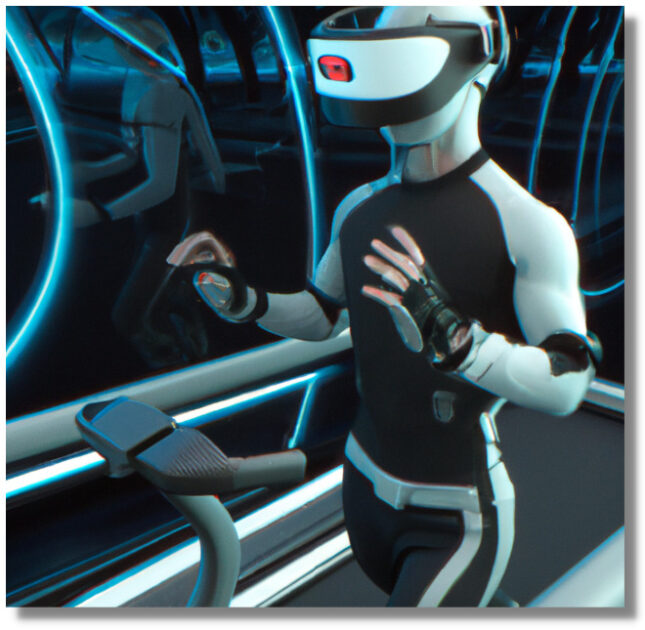
    Except for a VR headset, a Virtual Reality game system comprises other hardware and software. A fully immersive experience is the goal of VR gaming. In fact, a player can be cut off from the real world while playing. But a messy VR system can distort the game and take you out of the experience. Sometimes, the hardware itches or pinches. Anyways, here’s a quick look at what a complete VR game system looks like:

    A Virtual Reality Game System Including a VR Headset, Haptic Feedback, Treadmill, and a Gaming Room

    In the above image, the guy is playing a VR game with a full setup. But that’s not all. To understand the science and visual engineering behind the system, read on.

    PC requirements for a VR game System

    A PC’s GPU is one of the major players in the system. A GPU at least equivalent to NVIDIA GTX 970 / AMD R9 290 is a must for a VR game system. It should be powerful enough to run all the graphics-heavy games. A high-end CPU with multiple cores also helps. In fact, a VR-ready PC must have a minimum of 8GB RAM and a Video output of HDMI 1.3. Consoles like PlayStation VR and Xbox One X are also good options for gaming in VR. As they are specifically designed for VR, they don’t require additional high-end PC hardware setups.

    VR System’s Hardware

    Hardware includes a VR headset, tracking device, treadmill, a setup room, and controllers. Accessories may include a microphone, touchpad, and haptic feedback device. Players can use the headset to view the game world, interact with objects, and explore the environment. The tracking device monitors the player’s movements and adjusts the game accordingly. Controllers let them manipulate objects and control the character. Microphones enable voice commands and audio feedback. Touchpads provide tactile feedback. Haptic feedback devices simulate physical sensations.

    VR headset

    An illustration of a VR headset

    A headset that houses two small screens and a series of sensors. It allows players to view the game world in 3D. The obvious role of the headset is to provide a sense of immersion and presence. The smaller the headset is, the more degree of immersion a VR system has. To achieve best immersion, a headset should have a wide field of view, low latency, and a high refresh rate. A latency of fewer than 20 milliseconds is considered ideal for a smooth and realistic game experience. Talking about refresh rate, a minimum of 60Hz is recommended because it’s the refresh rate of human eyes. Any lower refresh rate may cause simulator sickness if you use the system for a long.

    Tracking device

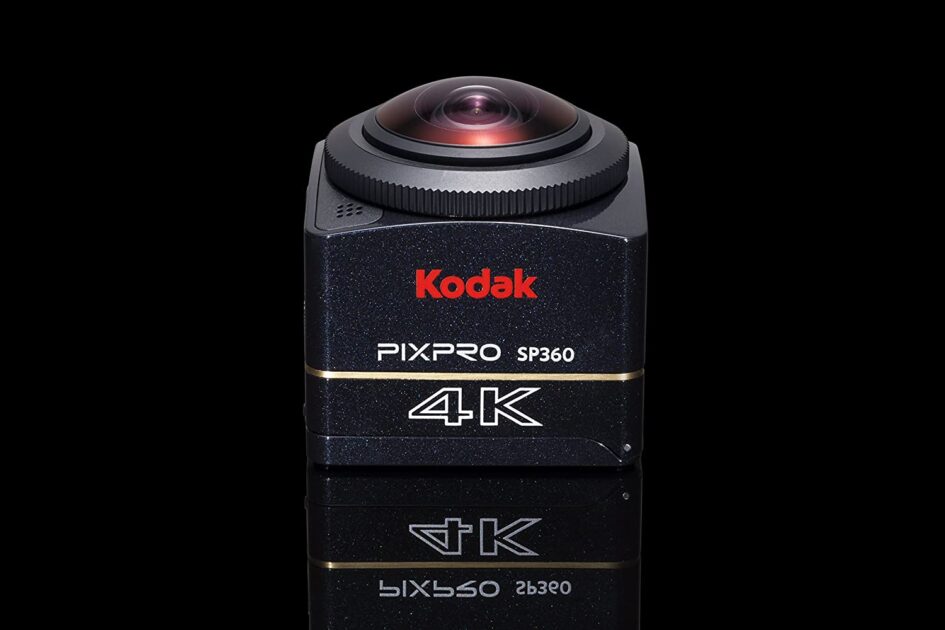
    Usually, a camera is the tracking device in a VR game system. A tracking device is included in most VR game systems you buy. If it does not have one, you can purchase one separately:

    Here is an example of a VR camera, Kodak PIXPRO SP360 4K:

    Image Credit: Amazon, KODAK

    However, some advanced systems may come with sensors based on infrared, ultrasound, or other technologies. The device tracks the player’s movements and adjusts the game accordingly. For example, when the player moves their head, the camera tracks the movement and updates the game environment accordingly. This is arguably as important as the headset because it enhances the degree of immersion by much. In fact, some VR games are optimized for/rely on the tracking device, such as those with motion controls or gesture recognition. The best tracking device can track a player’s physical movement in a 3D space with minimal latency.

    VR Treadmill

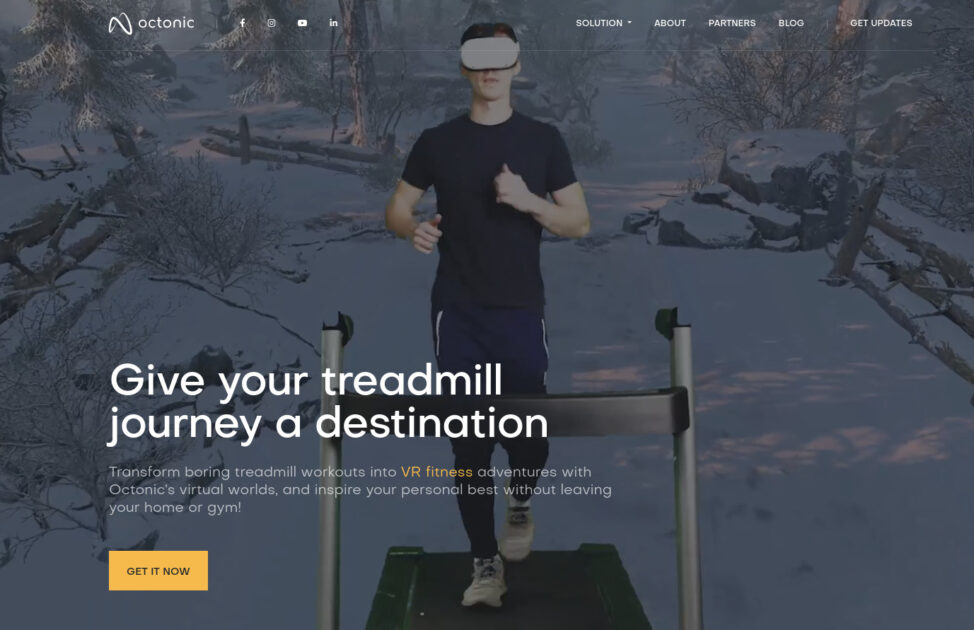
    VR Treadmill software for a game-like experience while working out
    Image credit: Octonic VR

    A VR treadmill allows a player to move in a virtual environment by moving in the real world. By walking or running on the treadmill, the player can explore the game world in a more realistic way. Apart from gaining a real physical experience while gaming, VR treadmills can also be used for a gaming experience while doing physical exercises. For example, even using a normal treadmill for workouts, you can use VR software with it to make it more fun and interactive. Some VR softwares even allow you to play racing games or run marathons while having a treadmill workout. Treadmills are not staple for all VR game systems, but the degree of immersion is undeniably high with one.

    The room

    The room where you play VR games is important for various reasons:

    • The room should be large enough so that you can move around without hitting anything.
    • It should be free of any distractions that can break your immersion in the game.
    • The lighting in the room should be just right – not too bright and not too dark.
    • The room should have good acoustics so that you can hear the game audio clearly.

    Haptic feedback device

    teslasuit.io’s haptic feedback VR suit

    No VR system is complete, or at least shouldn’t be, without a set of haptic gloves. A haptic feedback device is a device that can simulate physical sensations. For example, a haptic feedback device can simulate the feeling of touching a virtual object. Apart from the gloves, a complete VR game system includes a vest, a pair of trousers, and boots that can provide haptic feedback. The vest, trousers, and boots are often referred to as a “haptic suit.” The haptic suit covers the player’s upper and lower body, and it can simulate a variety of sensations, such as the feeling of wind. However, for people with certain medical conditions, such as epilepsy, it is not recommended to use haptic feedback devices.

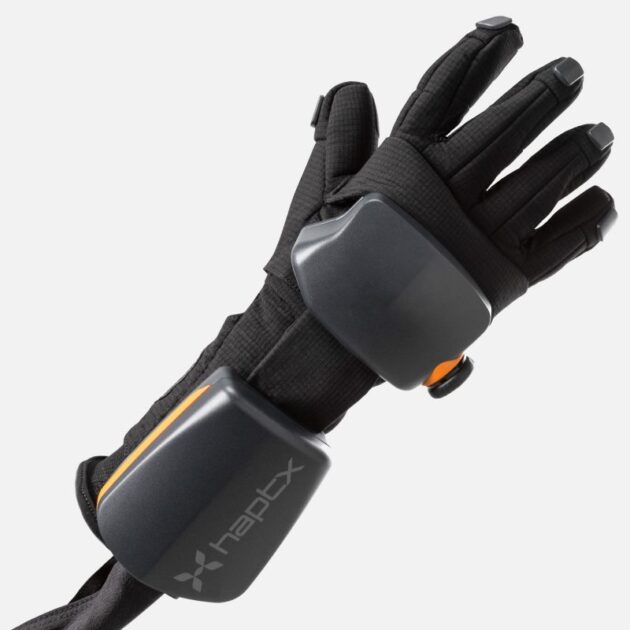
    Haptx G1 – The best Haptic VR gloves in the Market.

    Haptic VR Gloves from Haptx

    Haptx G1 VR gloves provide unmatched tactile feedback with hundreds of microfluidic actuators that physically displace skin. Force feedback applies up to 40 lbs of resistive force. Motion tracking with sub-millimeter precision and no latency. Airpack for roomscale use with 3-hour battery and no tethers. 1 lb gloves, 135 tactile actuators, 8 lbs resistive force, 36 DoF, 0.3mm accuracy, 18-month life. The thing that differentiates Haptx gloves from other VR gloves on the market is the weight of the vibrations you feel when you interact with virtual objects. This is due to the fact that there are 135 tactile actuators in each glove. This allows for much more detailed feedback and immersion into the virtual world.

    VR Controller

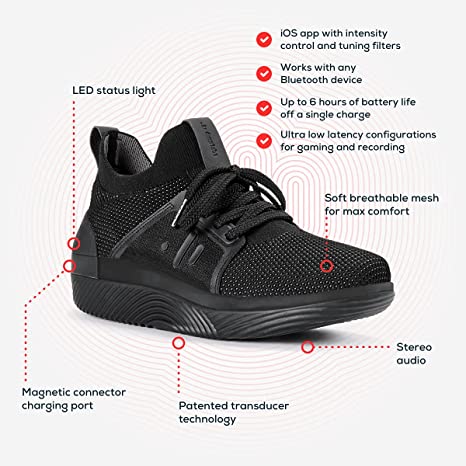
    VR controller from Amazon
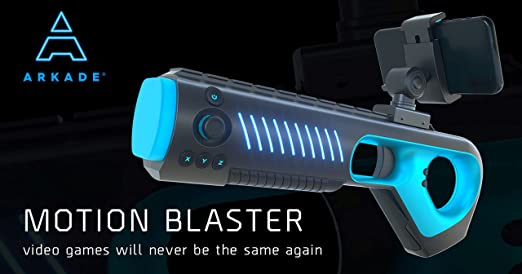
    Image Credit: Amazon, Arkade Store

    A controller is a device that lets you interact with the game environment. It can be in form of a normal game controller, a glove, a shoe, or a wand. The controller tracks your hand movements and lets you interact with the virtual environment accordingly. For example, if you want to pick up a virtual object, you can use the controller to do so. Some controllers also come with haptic feedback, as we already mentioned. Controller shoes are usually used for VR games that involve a lot of walking or running, such as racing games. That’s especially useful if the system does not include a treadmill. Other types of VR controllers include guns, paddle controllers, stilts, and steering wheels.

    All of these components create an immersive, interactive experience; but not without software.

    VR System’s Software/Game Visuals

    Software is a combination of a game engine, game content, and a player interface. All of these components work together to create an immersive VR gaming system. Game engines provide the game’s core mechanics and visuals. Game content includes characters, levels, and other elements. The player interface allows users to interact with the game.

    Game Development

    The most popular VR game engines are Unity and Unreal Engine 4. Here is an example of a part of using Unity to make VR games:

    using UnityEngine;
    using System.Collections;
    
    public class ExampleClass : MonoBehaviour {
        void Update () {
            // Get the user's input
            float h = Input.GetAxis("Horizontal");
            float v = Input.GetAxis("Vertical");
    
            // Apply the user's input to the character's movement
            transform.Translate(new Vector3(h, 0, v) * Time.deltaTime);
        }
    }

    The above code shows how game engines enable the game to process the user’s input and move the character accordingly. For example, in VR, the user can move their head or their hands to control the character. This part is often messy in most of the current VR games. Only a few like Beat Saber have optimized this part of the game to be smooth enough.

    The above code shows how game engines enable the game to process the user’s input and move the character accordingly. For example, in VR, the user can move their head or their hands to control the character. This part is often messy in most of the current VR games. Only a few like Beat Saber have optimized this part of the game to be smooth enough. There are two main parts of the game content: storyline and graphics.

    Storyline

    The other part of game content is the story. A good VR game should have an interesting story that can make the player feel like they are a part of it. For example, in the game Half-Life: Alyx, the player is Alyx Vance, a member of the resistance fighting against the alien Combine. The player follows Alyx as she tries to find her father, Dr. Eli Vance. The story is told through audio logs, notes, and conversations with other characters. It’s one of those few VR games with an interesting storyline.
    Graphics

    A good VR game is one that is optimized for the platform you are using. And here is where software comes into play. Most VR games’s graphics are not pretty much the range of a normal PC game. That’s because of the hardware limitations of the VR headset. An optimized game covers up the hardware’s shortcoming with great art direction. A good example of this is Arizona Sunshine, which is still one of the best-looking VR games, 6 years later in 2022.

    For a VR game system, optimizing the games for most headsets is necessary from the developer’s part. And when it comes to VR users, it’s better to buy a game that:

    • is developed specifically for VR
    • has great graphics
    • has an interesting story that makes you feel like the protagonist

    The role of AI in a VR game system

    As we’ve mentioned numerous times in previous articles, AI is key to immersive VR experience. In a good VR game, NPCs need to be intelligent enough to make realistic decisions and react to players’ actions. This requires advanced AI algorithms and the development of sophisticated AI engines. Only a few present-day VR games offer a high level of sophistication; most are cartoonish. For example, social media trolled Zuckerberg heavily for spending billions of dollars on Metaverse, which still has bad graphics. Look at this troll on Twitter:

    This is an alarm that developers must invest heavily in AI to create a full-blown VR game system. Using AI correctly eliminates the creepy things you see in the above image on the tweet, such as:

    • Low-resolution textures
    • Poorly animated characters
    • Poorly modeled environments
    • Repetitive or unnatural behaviors
    • Nonsensical physics

    AI can generate virtual terrain, simulate natural phenomena, and generate various textures and animations. It is also key to creating realistic environments, making NPCs act more like real people, and enhancing image and graphics in VR. But it’s not that cheap. For a proper VR game with realistic graphics, developers invest 7-8 figures in AI development. Below are a few examples of a basic AI algorithm I have created for a VR game system. The algorithm is written in Python and uses the OpenGL library for 3D graphics:

    Calculate the distance

    def AIControl(player_position, environment):
        # Compute distance from player
        distance = distance_calc(player_position, environment)
    
        # If player is within range, compute a reaction
        if distance < 10:
            response = AIReaction(distance)
    
            # Render 3D graphics
            render_3D_graphics(response)

    This example above is of calculating the distance between the player and the environment, and then computing a reaction. It also renders 3D graphics based on the computed reaction, which is a key for any VR game.

    NLP

    AI needs to understand natural language to interpret the voice of the player and respond to the system accordingly.

    def AINaturalLanguageUnderstanding(player_command):
        # Parse the command and extract the intent
        intent = intent_parser(player_command)
    
        # Generate response based on intent
        response = AI_response(intent)
    
        # Return the response
        return response

    Reinforcement learning

    In a Virtual Reality game, reinforcement learning is a key part of the AI. If the system’s AI is not constantly learning, the game will become stale and easy to beat. For this reason, the developers of the game must design algorithms that allow the AI to learn from its mistakes and get better over time.

    ```
    import numpy as np
    import opengl
    
    # Set up the environment
    env = opengl.Environment()
    
    # Create the AI agent
    agent = opengl.Agent()
    
    # Train the agent using reinforcement learning
    while True:
        # Take an action
        action = agent.act()
        # Observe the environment
        observation = env.observe()
        # Calculate reward
        reward = env.calculate_reward(action)
        # Update weights
        agent.learn(reward)
    
    ```

    Pathfinding

    Pathfinding, to allow the AI to find the shortest path between two points.

    def find_path(graph, start, end):
        queue = [[start]]
        visited = set()
        while queue:
            path = queue.pop(0)
            vertex = path[-1]
            if vertex == end:
                return path
            elif vertex not in visited:
                for current_neighbour in graph.neighbours(vertex):
                    new_path = list(path)
                    new_path.append(current_neighbour)
                    queue.append(new_path)
                visited.add(vertex)
        return None

    Image Recognition

    Image recognition allows the AI to understand what is being displayed on the VR screen. A tracking hardware device we mentioned earlier, also plays a key role here.

    def recognize_image(image):
        model = tf.keras.models.load_model('image_recognition.h5')
        result = model.predict(image)
        return result

    Cognitive reasoning

    Cognitive reasoning allows the AI to think and reason on its own, making the system more interactive.

    def reason_about_situation(situation):
        rules = RuleEngine()
        rules.add_rule(‘if situation A then do action B’)
        result = rules.evaluate(situation)
        return result

    Animations

    A VR game requires realistic 3D animations for the AI characters.

    def animate_character(character, action):
        model = AnimationModel()
        model.load_animation(action)
        model.animate(character)

    Bottom Line

    Apart from hardware, software, and AI, there are other aspects to consider when developing a VR game system. A good VR game needs a strong storyline and immersive gameplay because otherwise, it won’t be engaging. From a user’s perspective, any game can become boring if it doesn’t offer enough content or challenge. Most systems still lack good graphics and storylines. Arguments do exist that complete immersion into a VR game could cause some people to lose touch with reality. But that’s not how technology works. And if you are a buyer, you now know what to except from a Virtual Reality system. There is always a way to improve on what exists. As such, developers do not need to be greedy and should continue to push the envelope to enhance all aspects of VR games.

  • Best Programming Languages to Learn for Each Purpose

    Best Programming Languages to Learn for Each Purpose

    As of December 2022, there are more than 700 coding languages to choose from. The primary purpose of learning programming language/s is to build software. But it’s not that simple. There are many programming languages out there, each with its own sub-purpose. Some are good for building web applications, some are for mobile or desktop applications. While some languages are good for building games, some are good for building AI.

    Most common Programming Languages

    Most common Programming Languages:

    Programming Language Definition
    C C is a general-purpose, procedural computer programming language supporting structured programming, lexical variable scope, and recursion, while a static type system prevents unintended operations.
    C++ C++ is an object-oriented programming language designed to improve the program development process by allowing programmers to think more logically about their code. It is a compiled language, meaning that it is converted directly into machine-readable code.
    Java Java is a class-based, object-oriented programming language developed by Sun Microsystems in the early 1990s. Java is platform independent and is used to create software for multiple platforms.
    Python Python is an interpreted, high-level, general-purpose programming language. It emphasizes code readability, using indentation and whitespace to create code blocks rather than curly braces or keywords.
    JavaScript JavaScript is a lightweight, interpreted, programming language with first-class functions. It is most commonly used as part of web browsers, allowing client-side scripts to interact with the user, control the browser, communicate asynchronously, and alter the document content that is displayed.

    What Programming Language Should I Learn?

    Programming languages like Cobol, Perl, and Fortran are being obsolete. On the other hand, Python, Go, and Rust, have been riding bulls for years. As each programming language has its own specialty, it’s more about the trend of the purpose that you want to look for; not the trend of the language itself. For example, Python, a language used for web development, is becoming more popular due to surging web application development trends. And as it stands out from other web development languages with its syntax and readability, it’s the best choice for web development. So, before choosing which programming language to learn, it’s important to understand the purpose first, and the features second.

    Here are the best programming languages to learn for each purpose:

    Building games – C++

    Games require fast and reliable code. C++ is fast because of its close relationship to Assembly language. It means that C++ can give you more control over how you execute the code on the CPU. For example, when you need to create 3D graphics or implement complex algorithms, C++ will be a better choice than other languages. And as an added bonus, learning C++ will make it easier to learn other languages like Java and C#. That’s why more than 60% of professional game developers use C++. To build games with C++ programming language, you also need to understand game design principles and practice with game development engines. The first step is to choose a game engine like Unreal or Unity, and get familiar with it. Look at this example of using C++ to create a simple game of guessing the number:

    #include <iostream>
    int main()
    {
      std::cout << "Welcome to my game!" << std::endl;
      //Declare variables
      int score = 0;
      int lives = 3;
      //Game loop
      while (lives > 0)
      {
        //Display score and lives
        std::cout << "Score: " << score << " Lives: " << lives << std::endl;
        //Generate random number
        int number = rand() % 10 + 1;
        std::cout << "Guess the number between 1 and 10: ";
        int guess;
        std::cin >> guess;
        if (guess == number)
        {
          std::cout << "You guessed correctly!" << std::endl;
          score++;
        }
        else
        {
          std::cout << "Wrong guess!" << std::endl;
          lives--;
        }
      }
      std::cout << "Game over! Your final score is " << score << std::endl;
      return 0;
    }

    As you see, we are using C++ syntax and libraries (std::cout, std::cin, rand()) to create the game. Other popular game programming languages include Unity (C#), Unreal Engine (C++), and Java. They have their own set of libraries and syntax, so make sure to research which one best suits your needs. C++ is of superior mostly because it’s faster and gives you more control over the code.

    Web development – JavaScript

    JavaScript is the most popular language for web development. According to the Stack Overflow Developer Survey 2020, it was the top choice for web developers. That’s mostly attributed to JavaScript being a lightweight and powerful scripting language. JavaScript also allows developers to create dynamic web pages and applications. It’s popular for several reasons. For example, it’s easy to learn and use, it’s highly versatile, and it works well with HTML and CSS. Any web developer should have a firm grasp of how to use JavaScript to create websites. Here is an example of using JavaScript to create a basic heading text for a website:

    <!DOCTYPE html>
    <html>
      <head>
        <title>My Website</title>
      </head>
      <body>
        <h1>Welcome to My Website!</h1>
        <script>
          // JavaScript code goes here
          document.write("<p>This is my website.</p>");
        </script>
      </body>
    </html>

    And this is what the above code looks like on a webpage:

    We used the document.write() method to write a line of HTML code to the web page.

    Mobile Development – Java

    Java is the top choice for mobile app development, according to the Stack Overflow Developer Survey 2020. It is an object-oriented language and is used to build android applications. Java is also one of the most popular programming languages in the world and is used to create a wide range of applications. It is a secure language, and it also has a large community of developers who can help you with your projects. Here is an example of a simple android application’s part written in Java:

    public class MainActivity extends AppCompatActivity {
    
      @Override
      protected void onCreate(Bundle savedInstanceState) {
        super.onCreate(savedInstanceState);
        setContentView(R.layout.activity_main);
    
        Button button = findViewById(R.id.button);
        button.setOnClickListener(new View.OnClickListener() {
          @Override
          public void onClick(View v) {
            Toast.makeText(MainActivity.this, "Button Clicked!", Toast.LENGTH_SHORT).show();
          }
        });
      }
    }

    This code is to create a button and displays a toast message when it is clicked. Java is a great language to learn for mobile development, and it’s used by many companies and developers around the world. Other popular languages for mobile development are Kotlin, C#, and Swift. The superiority of Java is about its speed, size, and cross-platform support, a key to any mobile app’s audience reach.

    iOS apps

    Swift is the best programming language for creating iOS apps in particular. It was created by Apple specifically for developing iOS and macOS apps. Swift is a powerful and fast programming language that is easy to learn and use. Swift is also safe, meaning that it eliminates certain types of errors that can occur in other languages. Here is a code example of using Swift to create a simple app that displays a list of items:

    import UIKit
    
    class ViewController: UIViewController {
    
    @IBOutlet weak var tableView: UITableView!
    
    let items = ["item1", "item2", "item3"]
    
    override func viewDidLoad() {
    super.viewDidLoad()
    
    tableView.delegate = self
    tableView.dataSource = self
    }
    
    }
    
    extension ViewController: UITableViewDelegate, UITableViewDataSource {
    
    func tableView(_ tableView: UITableView, numberOfRowsInSection section: Int) -> Int {
    return items.count
    }
    
    func tableView(_ tableView: UITableView, cellForRowAt indexPath: IndexPath) -> UITableViewCell {
    let cell = tableView.dequeueReusableCell(withIdentifier: "Cell", for: indexPath)
    
    cell.textLabel?.text = items[indexPath.row]
    
    return cell
    }
    
    }

    In the example above, we are using the Swift programming language to create a simple iOS app that displays a list of items. We are using the UITableView class to display the list of items in a table view. The UITableView class is a part of the UIKit framework, which is a library of classes developers use to develop iOS apps.

    Desktop applications – C#

    C# is a great language for developing desktop applications. It is a Microsoft language and is used in conjunction with the .NET Framework. C# is a powerful and versatile language that is easy to learn. It is an object-oriented language and has a well-defined syntax. C# also has a large community of developers who can help you with your projects. Here is an example of a simple desktop application written in C#:

    using System;
    using System.Windows.Forms;
    
    namespace MyApp
    {
      public class Program
      {
        public static void Main()
        {
          Console.WriteLine("Hello World!");
          MessageBox.Show("Hello World!");
        }
      }
    }
    

    This code will display a console message and a message box. For example, C# is used in Visual Studio, one of the most popular IDEs for desktop application development. C# is a great language to learn for developing desktop applications. Other popular programming languages for desktop development are C++ and Java. The advantage of C# is its simplicity and its close relationship to other Microsoft languages and products.

    Machine learning – MATLAB and Python

    Machine learning is all about its 3 pillars: data, models, and algorithms.

    MATLAB

    MATLAB is the best programming language for machine learning because it integrates all three of these pillars into one platform. It also has a visual interface that makes it easy to visualize and analyze data. Here are examples of using MATLAB to create a simple machine learning model:

    Example 1

    load data.mat
    
    % Split data into training and test sets
    Xtrain = data(1:1000,:);
    ytrain = labels(1:1000);
    Xtest = data(1001:end,:);
    ytest = labels(1001:end);
    
    % Train a logistic regression model
    model = fitglm(Xtrain,ytrain,'Distribution','binomial');
    
    % Make predictions on the test set
    ypred = predict(model,Xtest);
    
    % Calculate the accuracy
    accuracy = mean(ypred == ytest);

    In this example, we used MATLAB to create a machine learning model. We used the fitglm function to train a logistic regression model. The logistic regression model is a type of machine learning model that is used to make predictions based on data. The predict function is used to make predictions on the test set. After that, the accuracy is calculated by comparing the predictions to the actual values.

    Example 2

    %% Load data
    data = readtable('data.csv');
    
    %% Split data into training and test sets
    rng(1); % For reproducibility
    cv = cvpartition(height(data), 'Holdout', 0.2);
    idx = cv.test;
    
    %% Train model
    model = fitctree(data(~idx,:), 'ResponseVar', 'label');
    
    %% Make predictions
    y_pred = predict(model, data(idx,:));
    
    %% Calculate accuracy
    accuracy = sum(y_pred == data.label(idx)) / height(data(idx,:))
    

    In the second example above, we are using MATLAB to load a dataset, split it into training and test sets, train a model, make predictions, and calculate the accuracy.

    Python

    Python, as we already know, is a versatile language that can be used for a wide range of tasks. It’s just easy to learn and has a well-defined syntax. It also has a large community of developers who can help you with your projects. Python is used in many machine learning applications, such as data mining, natural language processing, and predictive analytics. Here is an example of a simple machine learning program written in Python:

    import pandas as pd
    import numpy as np
    from sklearn.model_selection import train_test_split
    from sklearn.linear_model import LinearRegression
    
    data = pd.read_csv("data.csv")
    
    X = data[['feature1', 'feature2', 'feature3']]
    y = data['target']
    
    X_train, X_test, y_train, y_test = train_test_split(X, y, test_size=0.33, random_state=42)
    
    model = LinearRegression()
    model.fit(X_train, y_train)
    
    model.score(X_test, y_test)

    This code is using the scikit-learn library to train and test a linear regression model. Python is a great language for machine learning because it is easy to learn and has a wide range of libraries. Other popular languages for machine learning are R and Java. The advantage of Python is its ease of use and the many libraries available.

    Data science – R and Python

    R is the best programming language to learn for data science. It is a language that specializes in statistical computing and data analysis. R is easy to learn and has a well-defined syntax, just like python. It also has a large community of developers who can help you with your projects. R is used in many data science applications, such as predictive modeling, data visualization, and machine learning. Here is an example of a simple data science program written in R:

    library(tidyverse)
    
    df <- read_csv("data.csv")
    
    model <- lm(target ~ feature1 + feature2 + feature3, data=df)
    
    summary(model)

    This code is using the tidyverse library to read a CSV file and fit a linear regression model. R is a great language for data science because it is easy to learn and has a wide range of libraries. Other popular languages for data science are Python and Java. The advantage of R is its ease of use and the many libraries available. In data science, the most important thing is to be able to effectively manipulate and analyze data. And Python’s versatility and the wide range of available libraries come in handy, once more.

    Below is an example of using Python for data analysis for reading in a CSV file and printing the first five rows of the data. It will also print the data type of each column.

    import pandas as pd
    
    data = pd.read_csv("data.csv")
    
    #Print the first 5 rows of the data
    data.head()
    
    #Print the data type of each column
    data.dtypes

    Scripting – Perl

    Scripting is a form of programming that is often used for automating tasks, or for adding functionality to existing programs. Perl is a popular scripting language that is known for its flexibility and powerful text-processing capabilities. It is often used for system administration tasks, such as managing user accounts, processing log files, or setting up network configurations. Perl’s specialties in scripting include file manipulation, string manipulation, and working with regular expressions.

    Here is a simple Perl script that calculates the average of a list of numbers:

    #!/usr/bin/perl
    @numbers = (1, 2, 3, 4, 5);
    $total = 0;
    foreach $num (@numbers)
    {
    $total = $total + $num;
    }
    $average = $total / @numbers;
    print "The average of the numbers is $average\n";
    

    As you can see, this script uses an array (@numbers) to store a list of numbers, and a foreach loop to iterate through each element in the array. The total is calculated by adding up all the numbers in the array, and the average is calculated by dividing the total by the number of elements in the array. Perl is a very concise language, which makes it easy to write scripts that are easy to read and understand.

    Robotics – Different Programming languages with ROS framework

    If you want to get into robotics, there is no one “best” language to learn. This is because there are many different types of robots, and each type of robot requires its own set of skills and abilities. For example, industrial robots are often programmed in C++ or Java, while educational robots are often programmed in Python or Scratch. The best way to learn the programming language for your specific robot is to consult the documentation or ask the manufacturer.

    Here are some examples of different types of robots and the corresponding programming languages:

    • Industrial robots: C++, Java
    • Educational robots: Python, Scratch
    • Domestic robots: C#, JavaScript
    • Hobbyist robots: Arduino, Processing

    Robotics Engineers use ROS (Robot Operating System) in conjunction with programming languages for building robots. In this example, we will use ROS with Python to control a mobile robot. We will first need to install ROS on our computer. Then, we will create a Python script that will act as a ROS node. This node will subscribe to a sensor topic, and publish commands to a motor topic.

    #!/usr/bin/env python
    import rospy
    from sensor_msgs.msg import LaserScan
    from geometry_msgs.msg import Twist
    
    def callback(msg):
    print(msg.ranges)
    
    rospy.init_node('laser_subscriber')
    sub = rospy.Subscriber('/scan', LaserScan, callback)
    pub = rospy.Publisher('/cmd_vel', Twist, queue_size=10)
    
    while not rospy.is_shutdown():
    msg = Twist()
    msg.linear.x = 0.5
    pub.publish(msg)

    In this script, we first import the necessary ROS packages. Then, we create a callback function that will be called every time a new message is received on the /scan topic. This callback function simply prints out the ranges array from the LaserScan message. Next, we create a ROS node called laser_subscriber, and we create a subscriber that subscribes to the /scan topic. We also create a publisher that publishes the /cmd_vel topic. Finally, we create a while loop that will run until the ROS node is shut down. Inside this loop, we publish a Twist message on the /cmd_vel topic. The message tells the robot to move forward at a speed of 0.5 m/s.

    Natural language processing – Lisp

    Lisp is the second-oldest high-level programming language after Fortran. Many other languages including C, Pascal, and Scheme have had an influence on it. Learning Lisp is a great choice for building natural language processing APIs because of its list data structure which can represent any form of nested expression. The language is one of the functional programming languages, which means that you can easily write code to manipulate and process large amounts of data. The example below shows how to use Lisp to calculate the average word length in a sentence:

    (defun average-word-length (sentence)
     (let ((words (split-string sentence)))
     (if (zerop (length words))
         0
         (/ (reduce #'+ (mapcar #'length words))
            (length words)))))
    

    In this code, we are using the defun function to define a new function called average-word-length. This function takes a sentence as input and uses the split-string function to split it into individual words. Then, we use the mapcar function to apply the length function to each word in the list. Finally, we use the reduce function, to sum up, all the lengths and divide it by the total number of words to get the average word length.

    Large-scale web applications – Go

    Golang (Go) is a great language for large-scale web applications. This is because go was designed for exactly this purpose. A statically typed language with fast compile times, garbage collection, and built-in concurrency. Go is also very easy to learn, especially if you are coming from a dynamically typed language like Python. And because go is statically typed, you will catch more errors at compile-time instead of runtime. Here is an example of a simple web server in go:

    package main
    
    import (
        "fmt"
        "net/http"
    )
    
    func handler(w http.ResponseWriter, r *http.Request) {
        fmt.Fprintf(w, "Hello, World!")
    }
    
    func main() {
        http.HandleFunc("/", handler)
        http.ListenAndServe(":8080", nil)
    }
    

    As you can see, the code is very simple and straightforward. Go is also very efficient in terms of memory and CPU usage, which is important for large-scale web applications. Apart from large-scale web applications, Golang is also helpful for microservices like API and GRPC services.

    System programming – Rust

    System programming involves the development of individual programs that allow users to interact with the computer’s operating system and other system software. It requires languages that are close to the metal, that is, they give you more control over memory management and performance. This is where rust shines. Rust is a systems programming language that runs blazingly fast, prevents segfaults, and guarantees thread safety. Rust is also memory-efficient, so your programs will use less RAM. And because rust is statically typed, you will catch more errors at compile-time instead of runtime. Here is an example of a complex system programming using rust:

    use std::sync::atomic::{AtomicUsize, Ordering};
    use std::thread;
    
    static COUNT: AtomicUsize = AtomicUsize::new(0);
    
    fn main() {
        let mut handles = vec![];
    
        for _ in 0..10 {
            let handle = thread::spawn(move || {
                for _ in 0..100 {
                    COUNT.fetch_add(1, Ordering::SeqCst);
                }
            });
    
            handles.push(handle);
        }
    
        for handle in handles {
            handle.join().unwrap();
        }
    
        println!("Result: {}", COUNT.load(Ordering::SeqCst));
    }

    In this example, we are using Rust’s threading capabilities to increment a global counter. We are also using Rust’s atomic types to ensure that the counter is updated safely across threads. As you can see, Rust gives you a lot of control over how your code executes, which is critical for system programming.

    Related Reads:

    Conclusion

    The best way to learn a programming language is to aim of using it for something you’re actually interested in. There’s no single language that’s best for everything; some languages are simply more popular than others. Some points you need to address are: what you want to use the language for, and what language are you already familiar with. For example, mathematics formulae are not always useful; and pretty much the same goes for learning a new programming language. If you are a beginner and don’t have a specific goal, then try languages that have a low learning curve, such as Python or Ruby.

  • 7 Ways Virtual Reality Trading Stands Out

    7 Ways Virtual Reality Trading Stands Out

    According to a recent survey, more than 60% of traders believe that virtual reality trading will help them become more successful. Furthermore, more than 90% of traders reported that they would use virtual reality trading if it was available.

    Before the 18th century, trading was a physical activity. Then came candlesticks, that revolutionized the trading world. With the rise of candlesticks, traders started to understand markets better and speculate on price movements. After that, the age of technology was to come; when people started to trade stocks, currency, and commodities digitally. Now, with the introduction of virtual reality trading, trading takes a whole new approach. Here are the factors that attract traders toward Virtual Reality:

    Multiple trading screens

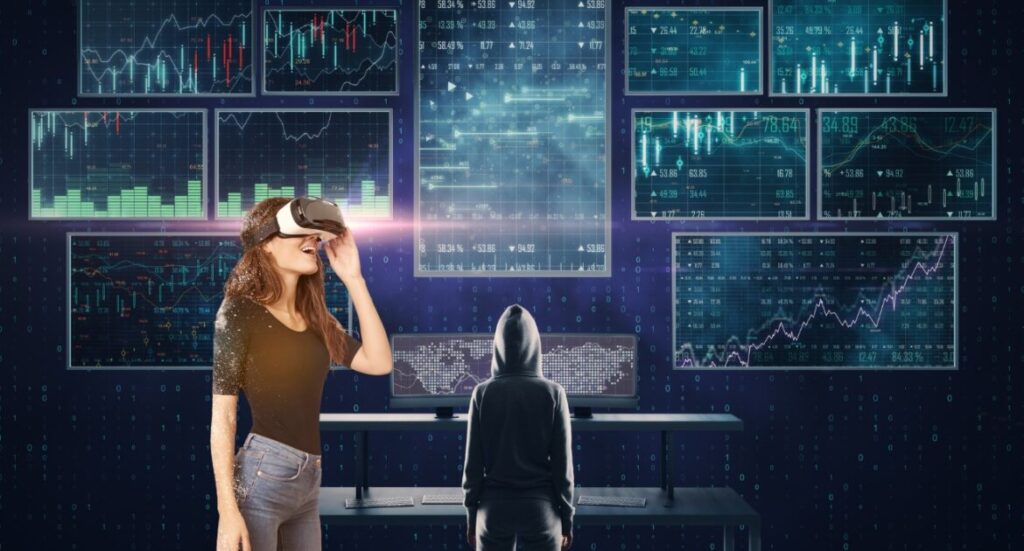
    VR Trading Platform

    One huge advantage of VR trading is that you can have multiple screens in front of you. A big whole world map is in front of you to see which markets are currently hot. Another screen to your broker’s platform to place trades, and a newsfeed to the side to stay up to date with the latest news. Even with an ultra-wide monitor, it’s hard to keep track of things as a trader. In VR, the limits are not sizes, but the big whole view of 360 degrees.

    From multiple viewpoints

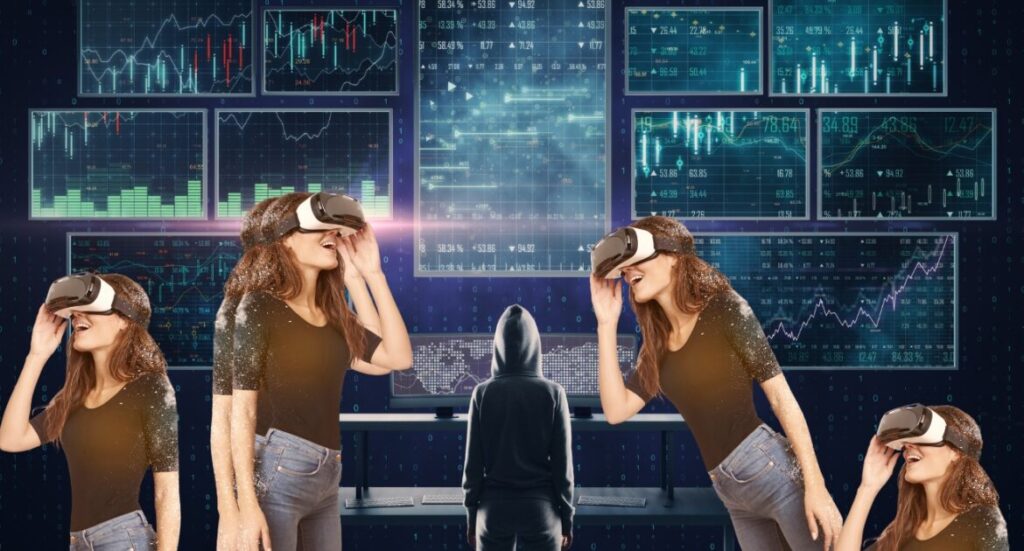
    VR trading from multiple viewpoints

    Another great thing about using VR in trading is that you can view things from multiple viewpoints. So if you wanted to see what was going on in different timeframes, you could do that simultaneously without issue. This could come in handy for day traders who want to make split-second decisions. Also, trading multiple stocks at a time is easier than ever before in VR.

    3D is better

    VR 3D Room

    Seeing things in three dimensions can be really helpful in understanding what’s going on. For example, you could see a 3D representation of the candlestick charts. Not only is this really cool, but it would also help you make better decisions as a trader. For example, you could see how the trends of different assets correlate with one another. Also, VR trading opens rooms for new ways of looking at the financial markets other than candlesticks. For example, instead of charts, with open, close, highs, and lows, you can use a more natural way of looking at things, such as with an “advanced heat map” that shows you where the price is.

    Use virtual tools

    VR tools

    In VR, there are a lot of different trading tools you couldn’t have used on a normal digital screen. Data is critical in trading, and being able to analyze it in new ways can be a big advantage. For example, you use technical indicators such as the RSI, Moving averages, or new virtual indicators. In VR, the indicator shows the mood of other traders in the market. That’s damn helpful.

    Stay calm in the heat of the moment

    Calm VR trader

    One of the hardest things about trading is staying calm when the markets are going crazy. In VR, you could practice staying calm in virtual situations that are similar to what you might experience in the real world. Yes, the point is about practicing trading in VR, rather than actually trading in it. But still, VR teaches a lot of things that sharpen your trading skills.

    No more distractions

    Trading in VR without distractions

    One of the worst things about trading is the distractions. With VR, you can trade in a completely distraction-free environment. You don’t have to worry about your kids making noise, your dog barking, or your phone ringing. You can just focus on the task at hand and make better decisions.

    Travel while you trade

    Trading while traveling in VR

    For many speculative day traders, traveling is difficult, as they need to stay close to their trading station. But with virtual reality, traders can travel while they trade. As VR is all about creating a 3D environment, traders can also take their trading station wherever they go and make trades from anywhere. So, you can trade during travel, or travel during trading. Anyways, you can stay connected to the market.

    Bottom Line

    While it may seem like a futuristic concept, it is actually a reality that is already being used by some investors. With the help of virtual reality, investors get a realistic view of the market and make informed decisions about their trades. This can not only give you a fair edge in the markets, but also make trading more efficient and enjoyable.

  • Introduction and types of virtual keyboards

    Introduction

    A virtual keyboard is a computer input device that allows users to type characters without using physical buttons. With such keyboards, users can type characters onto the device’s display by either using skin, or mouse. In the past, virtual keyboards were used for typing, and the most common one was windows’ on-screen Keyboard. Then came touch screen smartphones, where virtual keyboards became staple. But now, mostly, piano enthusiasts and even music experts are turning to virtual keyboards.

    Why a Virtual Keyboard over normal?

    Virtual keyboards come in various features and designs, suitable for different purposes. Any typist or musician may need if for various reasons. For example, to save time, save money, or simply for convenience. If you have all of them, still, a virtual keyboard could make you a better typist, or a better musician.

    There are two types of virtual keyboards:

    1. Virtual Keyboard for piano – replaces a piano keyboard digitally
    2. Virtual Keyboard for typing – replaces a computer’s physical keyboard

    Virtual Keyboards for Piano

    To clear up any confusion, virtual keyboard for a piano replaces a piano keyboard, not a typing keyboard.

    Most casual piano enthusiasts use a mobile device with a touch screen to play virtual piano keyboard. An uncommon way of using a virtual piano keyboard on a PC is by using mouse.

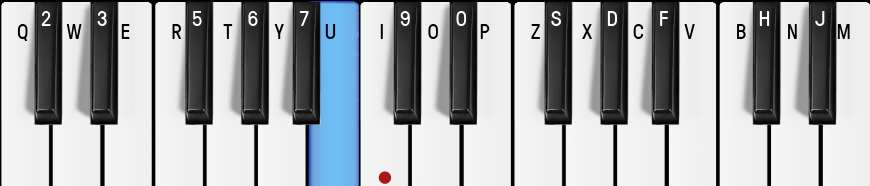
    However, a PC’s physical keyboard is best used as a virtual on-screen piano keyboard. For example, this one:

    virtual keyboard for piano
    Image credits: OnlinePianist

    A virtual keyboard could provide a certain level of flexibility, as it can be used as a controller or a synthesizer. With a virtual keyboard, you can control volume, panning, effects, and more. You can also use it to trigger samples or record loops. Furthermore, some virtual keyboards come with a built-in sequencer, allowing you to easily create musical arrangements. If you do not want to disturb your neighbors, you can plug in a pair of headphones and practice without making any noise. That’s not possible with most physical piano keyboards.

    Virtual Keyboard for Typists

    Typing in a virtual keyboard helps you improve your typing speed and accuracy. That’s because typing is not only about finger movements, but also about the feel of the keys. A virtual keyboard can help you to get used to it much faster. Furthermore, according to research, learning is better in a simulated environment because of the shorter learning curve. These keyboards can turn saviors when your physical keyboard fails and you need to quickly get your job done.

    People who use virtual keyboards can type up to 40% faster than those who don’t. That’s due to these 3 reasons:

    Virtual keyboards provide more accuracy – Yes, your accuracy significantly depends on how well you can use the real, physical keyboard. However, with virtual keyboards, you don’t have to worry about memorizing the key locations. This will improve your ability to use physical keyboards more accurately, and with more speed.

    You can type without looking at your fingers- With virtual keyboards, you can type without having to look at your fingers. This is because the virtual keyboard is always in the same position (unless you will to move it). This eliminates your habit of looking at your fingers while typing in a normal keyboard.

    It’s easier to learn the keyboard layout with a virtual keyboard- Furthermore, You can also see exactly how to type different keys with it. This will help you learn the layout of a computer’s keyboard faster.

    Virtual Keyboard for Gamers

    Virtual keyboards are also great for gamers. Apart from more accuracy, they provide faster reaction times, and more control. Virtual keyboards can also help you to become a better gamer as you can customize the layout to your own needs. For example, you can use macros to quickly activate your special abilities, or use shortcuts to quickly switch weapons. Additionally, you can use a virtual keyboard to practice gaming drills and increase your muscle memory. Of course, in gaming, a virtual keyboard can not completely replace a physical one. But you may use a virtual keyboard along with your normal keyboard and mouse for an edge. Some tournaments may not allow virtual keyboards, so you should check that before starting to practice with them.

    Bottom Line

    As virtual keyboards offer convenience, flexibility, and security, both experts and novices can benefit from them. Such keyboards have no demerits in general. However, if you are adding chrome extensions for virtual typing keyboards, make sure to choose a reputable one. Some of these apps can be malicious. Other than that, ones from Microsoft, Windows, and Apple are considered safe.

  • Game-based learning for ML Algorithms

    Game-based learning for ML Algorithms

    Introduction

    Games teach lessons. Research has already proven it with students. For Machine Learning (ML) algorithms, game-based learning is no exception. Any machine learning algorithm’s success relies on its ability to learn. To do this, it needs data. Games offer a unique way to instill skills and knowledge. By providing a playful, yet challenging environment, you can make machine learn and benefit from the experience.

    Here is an example of a game-based learning algorithm:

    ```
    import numpy as np
    import matplotlib.pyplot as plt
    
    # Create a dataset
    X = np.array([[0,0,1],
                  [0,1,1],
                  [1,0,1],
                  [1,1,1]])
    
    y = np.array([[0],
                  [1],
                  [1],
                  [0]])
    
    # Define the sigmoid function
    def sigmoid(x):
        return 1/(1+np.exp(-x))
    
    # Derivative of the sigmoid function
    def sigmoid_derivative(x):
        return x * (1 - x)
    
    # Define the loss function
    def loss(y, y_hat):
        return -np.mean(y*np.log(y_hat) + (1-y)*np.log(1-y_hat))
    
    # Define the neural network
    class NeuralNetwork:
        def __init__(self, x, y):
            self.input = x
            self.weights1 = np.random.rand(self.input.shape[1],4)
            self.weights2 = np.random.rand(4,1)
            self.y = y
            self.output = np.zeros(self.y.shape)
            
        def feedforward(self):
            self.layer1 = sigmoid(np.dot(self.input, self.weights1))
            self.output = sigmoid(np.dot(self.layer1, self.weights2))
            
        def backprop(self):
            # application of the chain rule to find derivative of the loss function with respect to weights2 and weights1
            d_weights2 = np.dot(self.layer1.T, (2*(self.y - self.output) * sigmoid_derivative(self.output)))
            d_weights1 = np.dot(self.input.T,  (np.dot(2*(self.y - self.output) * sigmoid_derivative(self.output), self.weights2.T) * sigmoid_derivative(self.layer1)))
    
            # update the weights with the derivative (slope) of the loss function
            self.weights1 += d_weights1
            self.weights2 += d_weights2
    
    if __name__ == "__main__":
        nn = NeuralNetwork(X,y)
    
        for i in range(1500):
            nn.feedforward()
            nn.backprop()
    
        print(nn.output)
    ```

    The above neural network learns to play a game. The game is a simple one; a game of logic. How the neural network learns to play the game is by simply playing it. Yes, it plays the game by making guesses; it makes guesses by using the sigmoid function. The sigmoid function is a mathematical function that takes a number and returns a number between 0 and 1. In simpler terms, it involves a neural network, fed with with weights, input, and output variables. As it is trained, it uses sigmoid and backpropagation functions to adjust the weights. In the end, it returns the predicted output.

    Game-Based Reinforcement Learning

    That was just one simple example of how game-based learning can be used for ML algorithms. Developers can also create games that teach reinforcement learning algorithms. By providing a stimulating environment, you can make the machine learn more effectively. With reinforcement learning, the machine must learn to optimize its actions in order to gain rewards. For example:

    
    ```
    import numpy as np
    
    # Initialize the environment
    env = Environment()
    
    # Define the reward function
    def reward(s, a, s_):
        return -1 if s_ == 'terminal' else 0
    
    # Initialize the Q-Table
    Q = np.zeros([env.observation_space, env.action_space])
    
    # Iterate through episodes
    for episode in range(1000):
        # Reset the environment
        s = env.reset()
    
        # Iterate through time steps
        while True:
            # Choose an action
            a = np.argmax(Q[s,:] + np.random.randn(1, env.action_space)*(1./(episode+1)))
    
            # Take the action
            s_, r, done = env.step(a)
    
            # Update the Q-Table
            Q[s, a] = Q[s, a] + learning_rate * (r + gamma * np.max(Q[s_,:]) - Q[s,a])
    
            # Check if the episode is done
            if done:
                break
    
            # Set the state
            s = s_
    ```

    The above example was of Q-learning, a type of reinforcement learning algorithm.

    Here is another example of reinforcement learning from Q-learning algorithm for the Pong game:

    import gym
    import numpy as np
    
    # Create the environment
    env = gym.make('Pong-v0')
    
    # Initialize the Q-Table
    Q = np.zeros([env.observation_space.n,env.action_space.n])
    
    # Parameters
    alpha = 0.8
    gamma = 0.95
    num_episodes = 2000
    
    # List to keep track of rewards
    rList = []
    
    # Training Loop
    for i in range(num_episodes):
        # Reset the environment
        s = env.reset()
        rAll = 0
        done = False
        j = 0
    
        # The Q-Table learning algorithm
        while j < 99:
            j+=1
            # Choose an action by greedily (with noise) picking from Q table
            a = np.argmax(Q[s,:] + np.random.randn(1,env.action_space.n)*(1./(i+1)))
            
            # Get new state and reward from environment
            s1,r,done,_ = env.step(a)
            
            # Update Q-Table with new knowledge
            Q[s,a] = Q[s,a] + alpha*(r + gamma*np.max(Q[s1,:]) - Q[s,a])
            
            rAll += r
            s = s1
            if done == True:
                break
        
        # Reduce chance of random action as we train the model.
        e = 1./((i/50) + 10)
        rList.append(rAll)
    
    print("Score over time: " +  str(sum(rList)/num_episodes))
    print("Final Q-Table Values")
    print(Q)

    Below is an example of game-based reinforcement learning, where you use an actual game to train a ML algorithm: (Using OpenAI’s library; works with the OpenAI Gym environment.) In the below example, the algorithm is trained using the FrozenLake game. The algorithm learns to take the most optimal path to the goal.

    import gym
    import numpy as np
    
    # Initialize the environment
    env = gym.make('FrozenLake-v0')
    
    # Initialize the Q-Table
    Q = np.zeros([env.observation_space.n, env.action_space.n])
    
    # Set the learning parameters
    lr = .8
    y = .95
    num_episodes = 2000
    
    # Create lists to contain total rewards and steps per episode
    rList = []
    for i in range(num_episodes):
        # Reset the environment and get the first new observation
        s = env.reset()
        rAll = 0
        d = False
        j = 0
        # The Q-Table learning algorithm
        while j < 99:
            j+=1
            # Choose an action by greedily (with noise) picking from Q table
            a = np.argmax(Q[s,:] + np.random.randn(1,env.action_space.n)*(1./(i+1)))
            # Get new state and reward from environment
            s1,r,d,_ = env.step(a)
            # Update Q-Table with new knowledge
            Q[s,a] = Q[s,a] + lr*(r + y*np.max(Q[s1,:]) - Q[s,a])
            rAll += r
            s = s1
            if d == True:
                break
        rList.append(rAll)
    
    print("Score over time: " +  str(sum(rList)/num_episodes))
    print("Final Q-Table Values")
    print(Q)

    Through a game, reinforcement learning algorithms can learn to take the most optimal path to a goal. That’s because the game provides the right kind of environment; for example, a maze-like game or an environment with obstacles. Real-world games can also be used to teach ML algorithms. Such games often contribute to teaching physical robots how to interact with real environments.

    Take this one for an example:

    As you see in the above YouTube video, deepmind’s humanoid robots are learning to play soccer in a virtual environment. And most importantly, they are getting better.

    Related Post: Machine Learning(ML) and Infinite Machine Learning(IML)

    Broad usage of game-based learning in ML

    Game-based learning offers many advantages over traditional learning methods for training algorithms. Traditionally, algorithms were trained through tedious manual processes. For example, manual trial and error, tedious programming, and other labor-intensive processes. Even popular programs from the past used to require long hours of tedious programming. Some examples of those programs were 90s-era adventure games and the first generations of gaming consoles.

    In most cases, game-based learning is used to improve in-game environments. For example, using game-based learning, developers can create NPCs that can learn from their successes and failures. As such, NPCs can evolve over time by taking into account the actions taken by players. But game-based learning’s even broader use is to make the algorithm learn from games, to implement in real-world scenarios and tasks. For example, if you have to train an algorithm to recognize objects in images, you can use a game-based learning platform to teach it how to recognize those objects. Similarly, games can also teach ML algorithms to predict crimes. That’s by feeding them data gathered from different in-game crime scenarios so that they can make better decisions.

    Game-based learning is not only about reinforcement learning. The definition of reinforcement learning is learning from reward and punishment; other approaches, such as evolutionary computing, are also used to teach algorithms through games. Game-based learning also offers the potential for scalability and repeatability. Algorithms can be tested on a large scale, and the same game-based learning experience can be reused and repeated for greater efficiency.

    Conclusion

    One interesting thing about the nature of games is that their rules and structure make learning suitable. There is no physical limitation to the number of players, only the imagination of the players. For any Machine learning algorithm, games are like an open playground they can use to learn, just like kids do. Formation of game-based learning helps the ML algorithms to discover new patterns and interpret data, while making the entire process enjoyable. Not only for game developers, but also for real-world scenarios, game-based learning for ML makes a difference.

  • Disney Plus Free Trial Availability Status Worldwide

    Disney plus has the cheapest basic plan of $6.99/mo among streaming tech competitors Amazon Prime and Netflix. They do not have free trials available on all countries – there was a time they did. However, as people started to abuse the free trial, they had to stop it. But it’s not that they don’t have free trials for any country; they do. We have created a table containing a list countries where Disney plus free trial is available, and where it is not. We will frequently update the table, as the status of availability keeps on changing.

    CountryDisney Plus Free Trial Availability
    AfghanistanNo Service
    AlbaniaNo
    AlgeriaNo
    AndorraNo
    AngolaNo
    Antigua & DepsNo
    ArgentinaNo
    ArmeniaNo Service
    AustraliaNo
    AustriaNo
    AzerbaijanNo
    BahamasNo Service
    BahrainNo
    BangladeshNo Service
    BarbadosNo
    BelarusNo
    BelgiumNo
    BelizeNo
    BeninNo
    BhutanNo Service
    BoliviaNo
    Bosnia HerzegovinaNo
    BotswanaNo
    BrazilNo
    BruneiNo
    BulgariaNo
    BurkinaNo
    BurundiNo
    CambodiaNo
    CameroonNo
    CanadaNo
    Cape VerdeNo
    Central African RepNo
    ChadNo
    ChileNo
    ChinaNo
    ColombiaNo
    ComorosNo
    CongoNo
    Congo {Democratic Rep}No
    Costa RicaNo
    CroatiaNo
    CubaNo Service
    CyprusNo Service
    Czech RepublicNo
    DenmarkNo
    DjiboutiNo
    DominicaNo
    Dominican RepublicNo
    East TimorNo
    EcuadorNo
    EgyptNo
    El SalvadorNo
    Equatorial GuineaNo
    EritreaNo
    EstoniaNo
    EthiopiaNo
    FijiNo
    FinlandNo
    FranceNo
    GabonNo
    GambiaNo
    GeorgiaNo
    GermanyNo
    GhanaNo Service
    GreeceNo
    GrenadaNo
    GuatemalaNo
    GuineaNo
    Guinea-BissauNo
    GuyanaNo
    HaitiNo
    HondurasNo
    HungaryNo
    IcelandNo
    IndiaNo
    IndonesiaNo
    IranNo
    IraqNo
    Ireland {Republic}No
    IsraelNo
    ItalyNo
    Ivory CoastNo
    JamaicaNo
    JapanYes
    JordanNo
    KazakhstanNo
    KenyaNo Service
    KiribatiNo
    Korea NorthNo
    Korea SouthNo
    KosovoNo
    KuwaitNo
    KyrgyzstanNo
    LaosNo
    LatviaNo
    LebanonNo
    LesothoNo
    LiberiaNo
    LibyaNo
    LiechtensteinNo
    LithuaniaNo
    LuxembourgNo
    MacedoniaNo
    MadagascarNo Service
    MalawiNo
    MalaysiaNo
    MaldivesNo
    MaliNo
    MaltaNo
    Marshall IslandsNo
    MauritaniaNo
    MauritiusNo
    MexicoNo
    MicronesiaNo
    MoldovaNo
    MonacoNo
    MongoliaNo
    MontenegroNo
    MoroccoNo
    MozambiqueNo
    Myanmar, {Burma}No
    NamibiaNo
    NauruNo
    NepalNo
    NetherlandsNo
    New ZealandNo
    NicaraguaNo
    NigerNo
    NigeriaNo
    NorwayNo
    OmanNo
    PakistanNo Service
    PalauNo
    PanamaNo
    Papua New GuineaNo
    ParaguayNo
    PeruNo
    PhilippinesNo
    PolandNo
    PortugalNo
    QatarNo
    RomaniaNo
    Russian FederationNo
    RwandaNo
    St Kitts & NevisNo
    St LuciaNo
    Saint Vincent & the GrenadinesNo
    SamoaNo
    San MarinoNo
    Sao Tome & PrincipeNo
    Saudi ArabiaNo
    SenegalNo
    SerbiaNo
    SeychellesNo
    Sierra LeoneNo
    SingaporeNo
    SlovakiaNo
    SloveniaNo
    Solomon IslandsNo
    SomaliaNo
    South AfricaNo
    South SudanNo
    SpainNo
    Sri LankaNo Service
    SudanNo Service
    SurinameNo
    SwazilandNo
    SwedenNo
    SwitzerlandNo
    SyriaNo
    TaiwanNo
    TajikistanNo
    TanzaniaNo
    ThailandNo
    TogoNo
    TongaNo
    Trinidad & TobagoNo
    TunisiaNo
    TurkeyNo
    TurkmenistanNo
    TuvaluNo
    UgandaNo Service
    UkraineNo
    United Arab EmiratesNo
    United KingdomNo
    UruguayNo
    UzbekistanNo
    VanuatuNo
    Vatican CityNo
    VenezuelaNo
    VietnamNo
    YemenNo
    ZambiaNo
    ZimbabweNo

    Scenarios for free trials depend on economic situation and possibilities of fraudulent activities. Disney plus might allow more free trials at any time, especially as video streaming platforms have been losing subscribers. Each time the company releases free trials for more countries, we will update this page.

  • Examples of Robots with Artificial Intelligence  (AI)

    Examples of Robots with Artificial Intelligence (AI)

    • Last Updated – December 8, 2022

    Introduction

    We can find examples of robots in a wide range of settings, and it’s not compulsory for robots to have AI. This article is all about examples of robots with Artificial Intelligence. However, before that, we need to understand the key difference between a robot and an AI, a physical robot and a digital one.

    Robot: Mechanical, programmed, physical, task-oriented.

    AI (Artificial Intelligence): Intelligent, self-learning, adaptive, data-driven.

    So, not all robots come up with AI. There are two common types of robots:

    1. Digital bots – Digital bots are those you face in games, chatbots, and virtual assistants. They use algorithms and AI to do their work.

    2. Physical Robots – Physical robots are the ones you see in factories and warehouses. They have a very minimal amount of programming installed and are very specific with the task.

    And the biggest field is robots with artificial intelligence, capable of learning and improving their physical performance. For example, a robot with AI interacts with its environment, makes decisions, and can even take corrective action. This helps them complete tasks that require creativity and problem-solving. For example, in search and rescue missions, robots with AI play a key role in finding survivors. Technical specialties like robotics engineering, AI, and computer vision are necessary to build robots with AI.

    The main reason behind building such robots is to cover up a broad range of applications. Even in a single industry like food, rather than repeating a specific task, robots with AI can not only pick and place objects but also learn to identify and sort food ingredients. AI alone could only let us learn complex patterns and stats about food. On the other hand, a robot alone could only handle simple, repetitive tasks. Here are some examples of robots with Artificial Intelligence:

    Ameca – Humanoid Robot with AI

    How can we not talk about Ameca when we are talking about robots possessing AI? She can push up, do a handstand, walk on her hands, and even do a headstand! One Ameca costs over $133,000. Following the 15-year hard work of Engineered Arts, the robot has grey-colored skin, with deliberate gender and race-neutral characteristics. Ameca attracts people towards her due to her smooth movements, especially with her almost-perfect human facial expression imitations. Also, while performing push-ups and pullups, the body movements are out of this world. Ameca is currently the best example of an AI-powered robot when it comes to a physical imitation of humans.

    Atlas – Humanoid Robot with AI

    Atlas robot, 2016

    Atlas is a humanoid robot, Boston Dynamics originally created for search and rescue missions in disaster areas. It was also able to open doors, carry heavy objects, climb ladders etcetera – all on its own. Furthermore, Atlas was also able to walk across slippery and uneven surfaces without losing balance – something that even humans find difficult to do! Like this:

    Atlas robot, 2021

    In this 2021 video clip above, however, you can see Atlas performing unreal backflips. And let me remind you that this is a physical robot, not an NPC. For your information, a physical robot performing such complex advanced movements is not possible without AI. First, such a robot needs a body and a set of sensors. Then, an AI model is trained to understand the robot’s environment and the robot’s actions. Finally, the AI model receives commands from a human (or other AI) and controls the robot accordingly. The Atlas robot you see above; even though it has AI, it is one of the smoothest, most realistic humanoid robot movements ever seen.

    Autonomous Cars – Robotic Vehicles with AI

    Autonomous cars are AI-powered cars that can drive themselves without any human input. Although this may not be the example you were looking for, theoretically, autonomous cars are robots with Artificial intelligence. Some examples of AI used in autonomous vehicles are Autox’s 4D Lidar and Waymo’s “Sense, Solve, Go”. Waymo’s AI process, “Sense, Solve, Go”, has driven over 20 million autonomous miles. We don’t need to explain too much, as this technology is already a norm. But still, whether or not to consider a car as a robot is a debatable topic.

    Perseverance – Space Robot with AI

    The Mars rover Perseverance uses an AI-powered device called the Planetary Instrument for X-ray Lithochemistry, or PIXL. The device uses AI to obtain information about the environment and is able to search for clues to help in the mission. The use of PIXL requires determination and strength of will, both of which are qualities of perseverance. If AI was not there, the mission would have been much more difficult for the robot. For one thing, it would have taken longer to sort through the data and find the answers. Even more importantly, Perseverance would have been unable to make decisions about where to explore and what to look for. The way AI is helping space robots is a testament to the ambition and dedication of the mission’s team. In fact, NASA has asked several times for the public’s help to train AI for its rovers.

    Robosen K1 Pro – Toy robot possessing AI

    Toy robot with AI
    Image Credits: us.robosen.com

    Robosen Interstellar Scout K1 Pro is a revolutionary robot with its cutting-edge technology and artificial intelligence. Weighing only 0.94 kg, it has 17 high-precision servomotors, 18 microchips, a built-in microphone, voice commands, Bluetooth connection, a built-in speaker, and a rechargeable lithium-ion battery. K1 Pro’s adaptive control algorithms simulate a human-like gait and allow for high-dimensional movements. It can be programmed with four different modes and responds to voice commands. The minimalist design is made of aerospace-grade materials and is controlled via 64-bit Android or iOS devices. It is a great gift to bring next-gen family entertainment. The role of Artificial Intelligence in the K1 Pro Robot is to give it the ability to understand and respond to voice commands, to move with precision, and to be able to perform stunts and other movements. You can buy it for $400.

    Miko 3 – AI-powered Toy Robot

    Miko 3 is ideal for kids who want to explore, play, and learn. It’s packed with deep-learning AI, educational STEAM content, and interactive games. Kids can enjoy new jokes, stories, and songs every month. With HD camera and sensors, Miko brings a full-on dance party. Plus, kids will be rewarded for progress with Miko Journeys. This $200 robot is an awesome AI-infused friend. You may be thinking that the level of programming this robot has isn’t enough to be called AI. But it can engage in two-way communication with people, using a natural language interface to ask and answer questions, as well as process human emotions. This is more than a gimmick.

    Examples of machines that are not robots with AI

    To better understand robots with AI, now we will also need to mention those without AI. Industrial robots, such as KUKA KR210, are used in factories without AI. They are programmed to carry out specific actions such as welding and assembly. Flying robots do not possess AI; drones cannot think for themselves. These robots possess a minimal form of programming that we can not consider as intelligence. AI requires sophisticated programming. Here are some examples of AI or robots that are not both:

    Dexarm Maker – Physical robot Without AI

    Dexarm maker
    Data credits: robotshop.com

    Dexarm Maker is a physical robot because it is programmed to move in a certain sequence, helping it move and perform a task similar to humans. It does not have its own intelligence. So, we can not consider it a robot with AI. The key point of identifying whether a machine has intelligence or not is its ability to learn, solve problems, and respond appropriately. This robot, for example, can sense, and act, but can not plan and act accordingly. According to the company website, it is suitable for 3-d printing, laser engraving, and cutting. Now, its 3.5-inch touchscreen does allow you to check the status and command Rotrics within your hand. But does this robot have Artificial Intelligence? No, it is nothing more than a physical robot with little programming. The amount of programming this robot possesses, can not be considered as AI.

    Recommended Post: Build your own AI

    NPCs – Bots; little to no intelligence, no physical existence

    Video game's NPC

    While most NPCs (non-player characters) in video games are not that intelligent, some still stand out and are good examples of digital artificial intelligence. For example, the AI bot in The Sims could get a job, go to work, socialize with other NPCs, and even fall in love. And as the game progressed, the AI got better at simulating human behavior. Another example is Ellie from The Last of Us Part II who is an AI-powered NPC. Throughout the game, she shows human emotions such as anger, sadness, love etcetera. She also makes decisions on her own (such as whether to kill an enemy or spare their life). But these bots are not physical enough to be called a robot. So, despite possessing AI, these NPCs are not robots. Hence, we can not consider them in the list of examples of robots with Artificial Intelligence.

    Equbot – Technically specified bot

    Equbot is an AI-powered stock market trading bot, that is integrated with IBM Watson to predict stock prices. Apart from historical market patterns, it also performs random analyses of news articles from all across the globe. The bot does this by analyzing data such as news, SEC filings, and social media. Its algorithm can automatically read and understand unstructured data (such as articles, blogs, etc). For instance, if news about the Consumer Price Index comes up, it will analyze that data based on technical market indicators and make predictions about future stock prices. It would have required a lot of human involvement, but the AI does that instantly, and passively. But despite being more capable than humans in predicting the market, this bot is not physical, hence not a robot. So, this bot does fit into the definition of a robot with AI.

    Conclusion

    Tech enthusiasts often get confused between different fields of AI and robotics, so we thought this article was a necessity. Apart from giving a variety of examples of robots with AI, we also discussed what we can’t consider AI. The main aim of all those examples was to clarify the difference between these two fields. Devices without AI are still valuable in a lot of ways. However, one clear thing is that emerging fields of AI, such as NLP, are transforming the robotics industry. With increasing AI capabilities, robots are performing more complex tasks and movements. Our responsibility is not limited to understanding, but also to use this technology responsibly.

  • When Search and Rescue (SAR) Robots Really Help

    When Search and Rescue (SAR) Robots Really Help

    Robots are increasingly becoming a staple in search and rescue missions. The ability to cover more ground and provide a more accurate assessment of a situation than human responders is invaluable in time-sensitive emergency situations. Search and rescue robots have proven their worth time and time again. And the same goes for their human counterparts.

    There are basically four types of search and rescue teams: air, ground, water, and structural.

    The most common search and rescue mission is finding missing hikers.

    The US handles about 225 search and rescue missions per year. The percentage of missions using a search and rescue robot in different ways, is large. In fact, the benefits of using one are pretty clear:

    Air Rescue Missions

    Most commonly, drones, a type of flying robot, are helpful in aerial search and rescue missions. Drones can cover a lot of ground quickly. Also, the team can equip it with thermal imaging to get a better assessment of the situation. From mapping out the disaster area to locating missing persons, drones have shown their usefulness in search and rescue. For example, in the aftermath of Hurricane Harvey, NASA aided with drones to assess the damage and find survivors.

    Ground Rescue Missions

    Ground robots are useful in a variety of search and rescue missions. Some of them can enter small spaces, like collapsed buildings, that humans can’t. Most ground robots possess sensors and cameras to help assess the situation and rescue. In the 2018 Thailand cave rescue, Chinoros Nakthewan and his robotics team used robots to map the cave and find the missing soccer team.

    Water Rescue Missions

    Water robots, or ROVs (remotely operated vehicles), are key in water search and rescue missions. For example, they can go places that humans can’t, like deep water or fast-moving rivers. ROVs are equipped with sonar, which helps them find missing persons or objects. For example, the rescue team used ROVs in the search for the missing Malaysia Airlines Flight MH370. In fact, the mission would have been impossible to even happen without those underwater robots.

    Structural Rescue Missions

    Structural search and rescue robots help assess the stability of buildings and other structures. Robots can enter places that are too dangerous for humans. Their sensors help them assess the stability of the structure and cameras to help find and rescue the missing persons. For example, Japan’s USAID used structural search and rescue robots in the aftermath of the 2011 earthquake and tsunami in Japan.

    Search and Rescue Cases a Robot Handled

    Search and Rescue Robot Drone

    Apart from the ones above, there are many other examples of search and rescue robots showing their worth.

    In the 2018 Sulawesi earthquake and tsunami, the 2017 Mexico City earthquake, and the 2016 Ecuador earthquake, drones showed the aftermaths of the destruction and helped with search and rescue missions.

    Econet, Zimbabwe’s leading media company, assisted with Cyclone Idai rescue operations in 2019. In case the drone identified the victims, they were programmed to offer rescue services.

    Waltham-based robotics company lent ‘Arm’, which played a vital role in the search and rescue efforts after the 2013 Boston Marathon bombing.

    Also, in the 2011 Fukushima Daiichi nuclear disaster, robot surveyed the nuclear plant’s reactors. The robots found high levels of radiation that would have been harmful to humans. The robot’s job was to survey underwater spaces that are too small for humans. In particular, this robot helped in the investigation of underwater leakage points of the retained water within a nuclear power plant.

    Conclusion

    Search and rescue robots are saviors. We have come to rely on these machines for their ability to find and rescue people in the aftermath of disasters. They help us locate and rescue trapped survivors in the rubble of collapsed buildings and other debris. For people who still think robotics is all about making vacuum cleaners, these life-saving machines are a reminder of how far we’ve come. And for those who believe robots will take over the world one day, they offer some reassurance that, at least for now, we’re still in charge. No single technology can ever replace the bravery and skill of first responders. But still, search and rescue robots are proving to be invaluable tools in the life-saving toolkit.